

3. Building the room
Building the room
In Visionaire a room is called a scene. You will find the scenes behind the house icon.
Scene and background
- Create a new scene and name it, for example,
cellar. - Open the scene properties with the small gear next to the "Objects" tab and choose a "Background image". Ideally a PNG in your game's resolution.
- Enter the scene as "First scene" in the game settings.
Where the character may walk
In the "Way systems" tab you draw a way border: a closed polygon over the floor. The character can only walk inside it. Don't drag it all the way to the walls, or Pia will walk into the furniture.
Objects: everything you can click
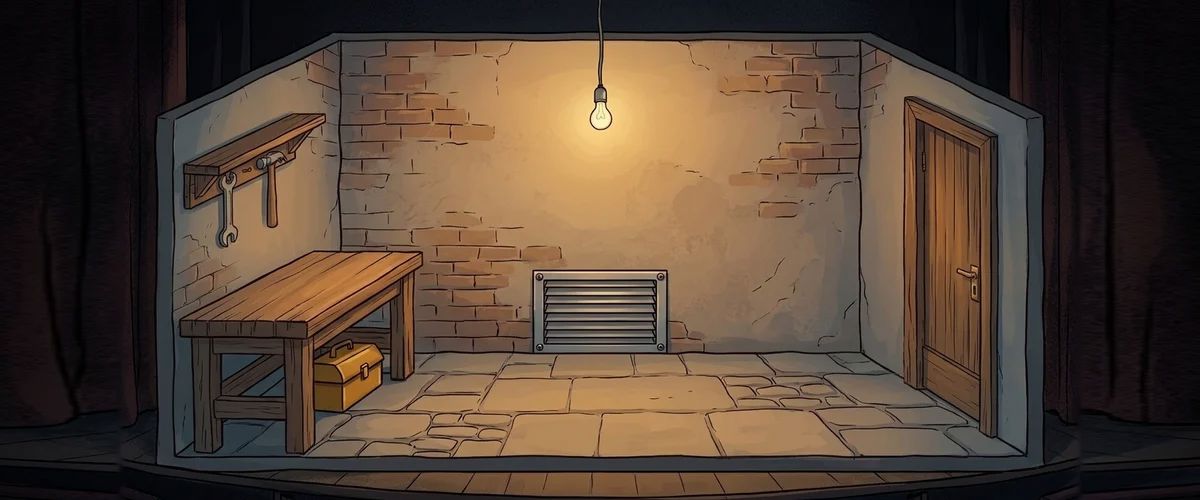
For every thing the player can interact with, you create an object in the "Objects" tab and draw its click area as a polygon. In the example: door, workbench, grate, screwdriver.
- Give every object an object name. The player sees it when moving the mouse over it.
- Set a position: this is where the character stops when doing something with the object. It has to be inside the way border.
The first action: looking
In the "Actions" tab of an object you define what happens. For every object, create an action for the look command and add the "Display text" action part:
Door:         "Locked. Of course."
Workbench:    "Someone has been tinkering here."
Grate:        "A ventilation grate. The screws look loose."
Screwdriver:  "A screwdriver. Could come in handy."
The description of the grate already is your first hint. Good adventures hide hints exactly like this: in the sentences the player reads anyway.
Rule to remember
Every object you can click needs a response. A click without a reaction feels like a bug.
Your task
A scene with a background, a way border and four objects, each with a look text. Test it.



