Login / Registrieren
DE EN FR ES IT CZ
Zurück Nach oben

5.1.6 Update released

  • #1, by SimonS 5 years ago Zitieren
    Fixes in 1217
    - html5 error in browser
    - 1.vis missing in ios build
    - earthquake not working
    - texts blink at 0,0 for a frame
    - non-sliding walk not working

    Changes in 1216:
    - option to relocate folders in context menu
    - button to play animations and particles separate
    - option to have text affected by rotate and scale
    - interface components: text, transform, shader
    - start action and wait
    - objects affected by lightmap
    object.LightmapAffected = true
    - separate forces in earthquake via Lua:
    game.Quake = true
    game.QuakeForceX = 0
    game.QuakeForceY = 5
    game.QuakeSpeed = 5
    - set circle center and things like blur radius
    game.FadeCenter = {x=0,y=0}
    game.FadeInCenter = {x=0,y=0}
    game.FadeRadius = 5

    Fixes:
    - operator is sometimes set to blank
    - spinner can't mark and edit
    - spinner scroll too wide
    - transform not previewing right
    - comments missing
    - Text: wait until "falsch"
    - ios memory issues
    - mac crashes after some time
    - mac cursor jumps
    - linux fullscreen
    - files filter is set as *.apksigner.bat
    - getProperty("system_language") returns nil on Android
    - audio dialog double click renames instead of selecting
    - combobox for audio value is now longer
    - clear outfit selection on selecting character
    - renaming waysystem possible and scene takes name
    - transition areas not working
    - search offsets wrong after scroll = dpi 1.25 treeview fail
    - movie components not pausing with pause
    - hidden interfaces are still shown as interaction area in the console
    - 125% dpi corrupts tree indentation
    - file dialog names missing
    - scroll errors, scrolls right and back if scroll position was not reachable

  • #2, by unkunst 5 years ago Zitieren
    Cool & big thx for fixing. I will test the earthquake-functionallity on weekend.
  • #3, by afrlme 5 years ago Zitieren
    quick note: for those of you who are wondering where the minification/magnification options went from the main game settings section of the VS editor, you now just need to tick the "activate pixel effect" option to enable nearest neighbor.
  • #4, by sebastian 5 years ago Zitieren
    thanks for this update smile
  • #5, by unkunst 5 years ago Zitieren
    It works.:-) Thanks a lot. :-))))
  • #6, by TinTin 5 years ago Zitieren
    Thanks a lot Simon!. Great update!
  • #7, by sebastian 5 years ago Zitieren
    non-sliding walk animation still has issues on 1217.
    Character walks very slow.

    nothing changed in the Editor 


  • #8, by SimonS 5 years ago Zitieren
    Bugfix update 1218 is uploaded, fixes:

    • walking with walk steps too slow
    • set android sdk to 29 to skip signing requirements
    • explorer: objects are not renameable
    • selecting waypoints resets scene
    • selecting action part after copy paste glitches
    • undo in scripts/texts not working correctly sometimes
    • long first line in scripts invisible sometimes
    • - keyaction shown as folder
    • action part tween, targetvalue not selectable
    • action text blinks after cutscene
    • macos console not visible if shaders are used
  • #9, by tale-finch-games 5 years ago Zitieren
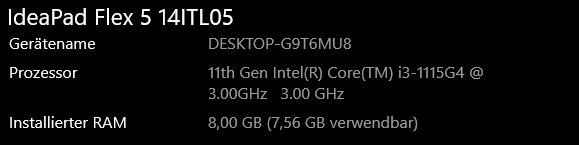
    Hi thanks for the update. Still have a question and that is when scenery starts via Visionaire Player the screen freezes for 10 seconds. Is this a bug? It was not with the previous version. See screen for system info.
  • #10, by SimonS 5 years ago Zitieren
    that's probably because of some antivirus.
  • #11, by tale-finch-games 5 years ago Zitieren
    I did a complete reboot and the error was solved. Strange hm right