Login / Registrieren
DE EN FR ES IT CZ
Zurück Nach oben

Zoom character away maintaining pixel size?

  • #1, by fulviov 11 years ago Zitieren
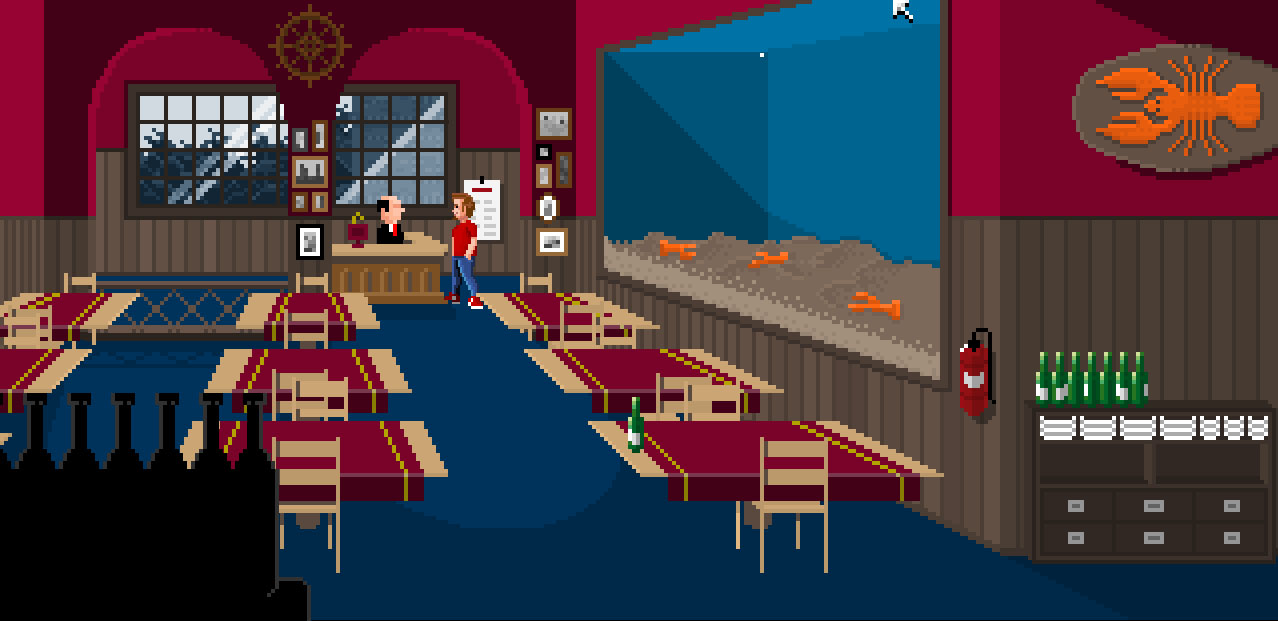
    The game I am making is a vintage point and click adventure, Maniac Mansion style, with a very low resolution (virtual resolution actually - one pixel in game is 4 pixels on screen).
    As you can see from the screenshot below, when the character is zoomed out in the distance, this results in a weird contrast between pixel size (the pixels of the main character on the right are far smaller than the rest of the scene)
    Can anyone think of a nice solution to avoid this?
    I was thinking of giving the character several outfits according to the zoom level (100%, 75%, 50% and 25%) and maybe trigger them with action areas, but it seems to me like a clunky solution and I am not sure about how well this would work.
    Thanks in advance Visionaire people! smile
  • #2, by Lebostein 11 years ago Zitieren
    Why a "virtual" low resolution? You could use the original low resolution (1 pixel = 1 pixel) and activate the game option "Activate pixel effect". Then you get the real oldscool feeling without any antialiasing or scale problems.
  • #3, by fulviov 11 years ago Zitieren
    From what I understand (and I have just tried it, but maybe I am doing it wrong) if I have a 320x240 background it won't scale it up to a 720p window when running the game? I just get a black window with a 320x240 background on the top left
  • #4, by fulviov 11 years ago Zitieren
    That is with pixel effect activated, of course
  • #5, by Lebostein 11 years ago Zitieren
    Download the Dave-Starterpack. This is a real 320 x 200 pixel game:
    http://www.maniac-mansion-mania.com/index.php/en/ressourcen/...

    Try it first with the standard option and you see a blurred graphic. And now you turn on the "Activate pixel effect" and start it again.
  • #6, by fulviov 11 years ago Zitieren
    Ok, the problem is - I want my game to run in both fullscreen and window mode, and you can't really make people play on a stamp-sized window grin

    If you open the Dave-Startpack game and set the resolution to 1280x720, you can see that the pixels are not stretched to fill the window, but you are left with a small rectangle on the top-left
  • #7, by Lebostein 11 years ago Zitieren
    If you use the "Activate pixel effect" then the game graphics should have the same resolution you set in the game settings.

    In your case I would dispense with the windowed mode and use the real resolution 320 x 180 pixel (this is 16:9) with the "Activate pixel effect" option. What about people who have a 4k monitor? Your 1280x720 windowed game is a postcard too.

    I wonder that the size of the window in windowed mode is not adjustable in Visionaire... this could solve the "stamp"-problem and you could build your game in real 320 x 180 pixel with all benefits.

    PS: I am not sure about your resolution. To reach 720p I see two ways only:
    16:9 (320 x 180) x 4 = (1280 x 720)
    4:3 (320 x 240) x 3 = (960 x 720)
    It is impossible to reach 1280 x 720 with a scale factor of 3.
  • #8, by fulviov 11 years ago Zitieren
    Well I am trying to find a compromise between not giving window mode at all, and giving 2 window mode options (1280x720 and 800x600), plus of course fullscreen.
    I understand that there are people with 4k monitors, but they can still play fullscreen (with pixel effect) and I believe they are still a minority anyways.
    I think as a usability point of view, not giving the possibility for users to play in a window is very bad, but this is just my opinion of course.
    As you suggested, having the possibility to resize the visionaire window at original resolution would be ideal, but I don't think it's possible right now (I would be happy to be proven wrong though)

    Anyway, given the constraint (I am not willing to give up window mode) any hint would be really appreciated smile
  • #9, by Lebostein 11 years ago Zitieren
    If the window in windowed mode would be free resizeable, then all your problems will be solved with the pixel effect mode. In that case the game would look clean pixelated with any window size.

    Developers? Is this possible?
  • #10, by afrlme 11 years ago Zitieren
    Er... I've just skipped through the thread as I've to go out shortly, but have you activated fullscreen & widescreen support in: extras > options... > player: fullscreen (enabled), activate support for widescreen displays (enabled).

    It should auto scale your game to whatever resolution your desktop happens to be.
  • #11, by fulviov 11 years ago Zitieren
    Er... I've just skipped through the thread as I've to go out shortly, but have you activated fullscreen & widescreen support in: extras > options... > player: fullscreen (enabled), activate support for widescreen displays (enabled).

    It should auto scale your game to whatever resolution your desktop happens to be.


    Yep, but that is for fullscreen - the problem is in window mode smile