Login / Registrieren
DE EN FR ES IT CZ
Zurück Nach oben

Visionaire Update 5.0.8

  • #20, by franz 7 years ago Zitieren
    The shadertoolkit is not really well versioned, the newest is here: https://www.visionaire-studio.com/luadocs/#finished-scripts

    It works, thank you Simon! smile
    Do you know if the following link will be updated too?

    https://wiki.visionaire-tracker.net/wiki/Compiled_Index_of_L...
    I can update that. I think the current version on the wiki is from the final version of Visionaire Studio 4.25 - probably.

    It will be great for sure! smile

  • #21, by marko-taali 7 years ago Zitieren
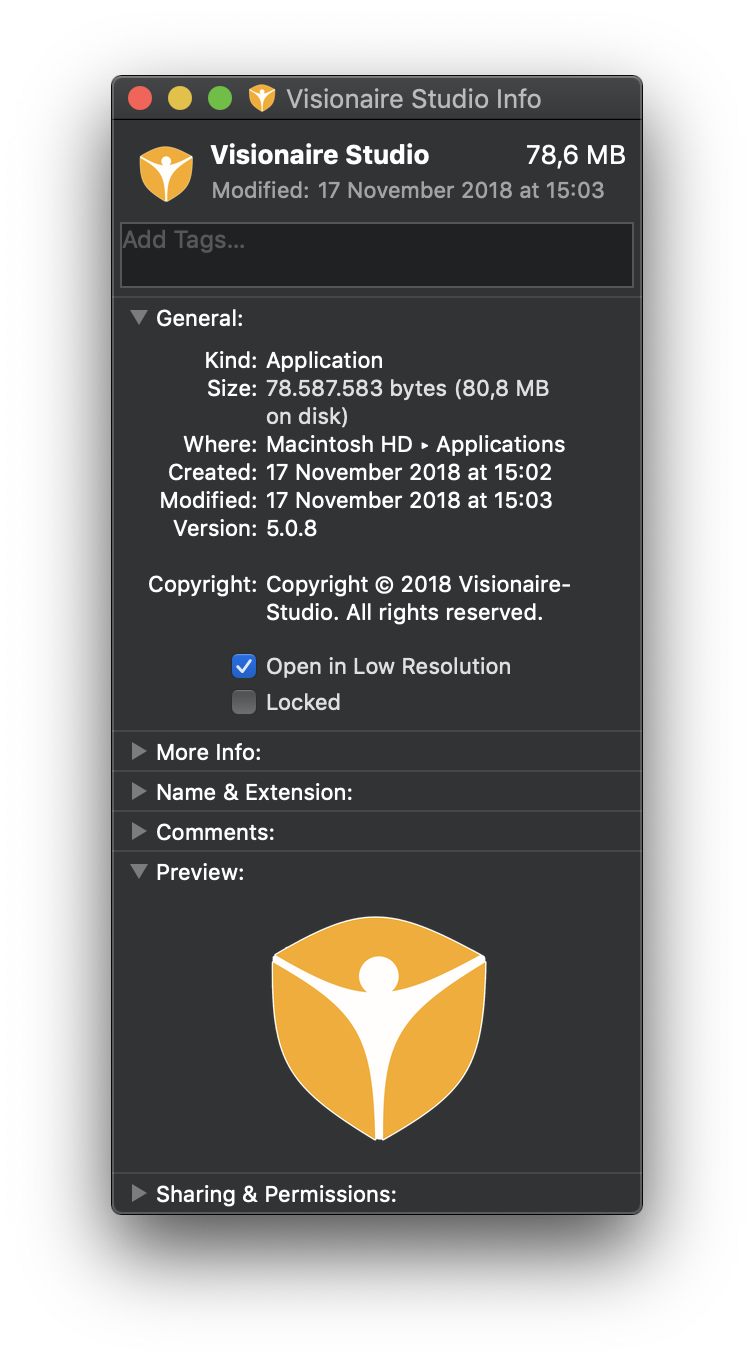
    Hmm... setting visionaire to open in low resolution seems to have fixed the problem
    el_gee, I'm having the same black screen and crashing -problem on Mojave. How do you go about changing the settings?

  • #22, by trepn 7 years ago Zitieren
    cmd+i on the app icon and check the box.
  • #23, by marko-taali 7 years ago Zitieren
    Oh, it helped! Thank you very much, sir.
  • #24, by dorobo 7 years ago Zitieren
    Thanks for an update. I've noticed one thing. I draw my game in 1920 x 1200 but have a default  resolution set to 1920 x 1080 in game properties. So before this update Visionaire would center it nicely and only scroll vertically if the edge approached by a player but now it does the scrolling on start of the scene or starts to move the scene vertically in other unexpected ways. I think it reacts to scenes where walking area goes over the edge of 1920x1080. Others seem to be fine. 

    edit: sorry im not on discord
  • #25, by davide-berardi 7 years ago Zitieren
    Hey guys I just updated and when I try to start the editor it just shows a red screen. I'm on Mac OS 10.13.6 on a MacBook Pro 17inch early 2011. HELP!
    UPDATE: Still not working, can ANYONE help???
  • #26, by arturo 7 years ago Zitieren
    Hey guys I just updated and when I try to start the editor it just shows a red screen. I'm on Mac OS 10.13.6 on a MacBook Pro 17inch early 2011. HELP!
    UPDATE: Still not working, can ANYONE help???

    I just updated to this version and got the same problem. But it gets fixed if I resize the window. I just drag the corner to resize it, and then I can make it full screen and it still shows correctly. I hope it fixes your problem too.
  • #27, by davide-berardi 7 years ago Zitieren
    IT WORKS! YOU ARE AWESOME!