Login / Registrieren
DE EN FR ES IT CZ
Zurück Nach oben

Visionaire SHADER ToolKit Demo

  • #1, by unreal 12 years ago Zitieren
    Hello everyone,

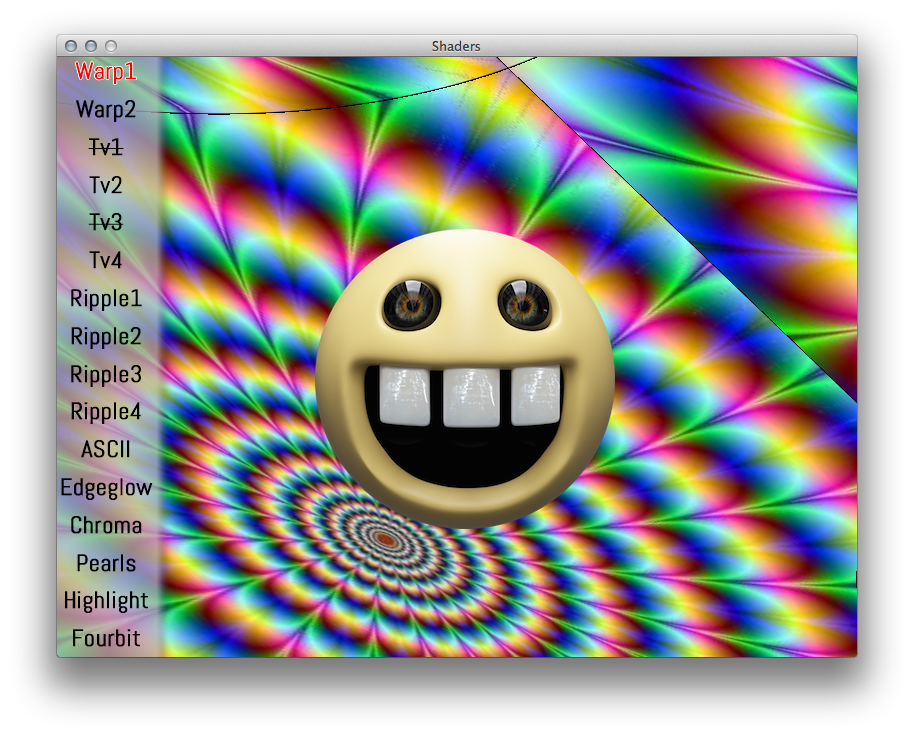
    I've made a little "tech demo" project so people can see some of the FXs that you can get from the Shader ToolKit.

    Modify it or add other FXs then share it with us !

    Enjoy

    Thanks to SimonS for the Scripts !
    (I don't own any image in this project, don't sue me ^^)


    EDIT1 : Sorry, I've forgot to mention that the project is for Visionaire 4.1 or greater only.
    EDIT2 : Added Video.
    EDIT3 : Added Image and 'Read-Me file'
  • #2, by afrlme 12 years ago Zitieren
    Nice work mate.

    I noticed you didn't include some of them. I guess because they didn't apply to scene objects properly? I know some of them seem to affect the whole image & not just the alpha mask, from some tests I've done myself.

    If you don't mind I'll add this to the list of resources on the shaderEffects wiki page? I am planning to make my own .ved for it at some point but it's quite large task & I've got loads of other pages I should sort out beforehand. Have you checked out any of the .ved examples I've provided on the wiki (so far) for some of the shader functions?

    If you could send me some text/information to add in a readme file such as notes, instructions, contact details etc - that would be great, cheers.
  • #3, by unreal 12 years ago Zitieren
    Nice work mate.

    Thanks AFRLme !
    I noticed you didn't include some of them. I guess because they didn't apply to scene objects properly? I know some of them seem to affect the whole image & not just the alpha mask, from some tests I've done myself.

    Yes I didn't manage to make them working, probably because those ones didn't worked with the scene object like you said.
    If you don't mind I'll add this to the list of resources on the shaderEffects wiki page?

    Yeah of course you can use it for the ressources ! wink
    I am planning to make my own .ved for it at some point but it's quite large task & I've got loads of other pages I should sort out beforehand.

    I'm excited to see this, I understand that it's time consuming ^^.
    Have you checked out any of the .ved examples I've provided on the wiki (so far) for some of the shader functions?

    I'm not quite sure, where can I find it ?
    If you could send me some text/information to add in a readme file such as notes, instructions, contact details etc - that would be great, cheers.

    Sure, I will.
  • #4, by afrlme 12 years ago Zitieren
    The .ved examples are located on the example pages of the functions via the script index.

    http://wiki.visionaire-tracker.net/wiki/Compiled_Index_of_Lu...

    I've not gotten round to sorting out all the shader function pages yet or created .ved's for all of the ones I have written. I think I've created working examples for:

    • shaderBlur
    • shaderColorize
    • shaderContrast
    • shaderGlow
    • shaderLightness
    • shaderNoise

    I've also created 2 tutorials (so far) which come with .ved examples @ http://wiki.visionaire-tracker.net/wiki/Tutorials

    I'm quite proud (indiscriminent self boasting) of the dynamic lighting tutorial demo. It took me ages to sort out the graphics & get it all working correctly. I went OCD on it. I'm not much of an artist mind. I find it much easier to code than draw/paint.
  • #5, by SCUD24 12 years ago Zitieren
    Nice work, that was a pretty good example of the shaders!
  • #6, by divas1980 12 years ago Zitieren
    tk for this demo!!
  • #7, by divas1980 12 years ago Zitieren
    question: the project file work only the latest versione of visionare?
    I have 4.0 beta and when open the ved file there is a error: "Cannot Load Game. If the file is damaged you have to use a baclup".

    The zip file work nothing error when extract the files.
  • #8, by unreal 12 years ago Zitieren
    question: the project file work only the latest versione of visionare?
    I have 4.0 beta and when open the ved file there is a error: "Cannot Load Game. If the file is damaged you have to use a baclup".

    The zip file work nothing error when extract the files.

    Oups, sorry I've forgot to mention that, the project is only for Visionaire 4.1 or greater.
  • #9, by afrlme 12 years ago Zitieren
    I think some of the internal code of the engine was changed in regards to some of the official shader functions. So the shader toolkit only works with 4.1 plus.
  • #10, by SimonS 12 years ago Zitieren
    I really like the potential the demo shows, I think I'll add more variables to the shaders, especially for the ripple and warp effects. Seems only these two shaders aren't working, will fix it then, when I find the time.
  • #11, by andy-rinaldi 12 years ago Zitieren
    Thanks to all!!!