
Login / Registrieren
DE EN FR ES IT CZ
Zurück Nach oben

Visionaire 5 Public Beta Test now live!

  • #70, by SimonS 9 years ago Zitieren
    The export options will get better, especially for Android, I want the possibility to make apks that can directly published, but that's still some work.

    As written in the first post, DX11 required (DX10 support level). You can try gl like I did here: http://www.visionaire-studio.net/forum/thread/visionaire-5-p...!/2/#15
  • #71, by ArtNova 9 years ago Zitieren
    In 'Cursors' tab 'Set animation center' is not functional, inactive.
    While creating new cursor and loading an image Im getting 2 frames. Switching between two cursors and back - second frame disappears.

    Also I really hope for detailed documentation for v5, especially on scripting. Some more examples on differenet game types and interfaces will be amazing. Thanks.
  • #72, by Paupasia 9 years ago Zitieren
    When you open the explorer, no way to close it.

    Interfaces: where are the tabs active/inactive image? I have a diary with lot of pages but now I'm unable to add new pages.


    Some news about the flashing transitions? grin
  • #73, by afrlme 9 years ago Zitieren
    In 'Cursors' tab 'Set animation center' is not functional, inactive.
    While creating new cursor and loading an image Im getting 2 frames. Switching between two cursors and back - second frame disappears.

    Also I really hope for detailed documentation for v5, especially on scripting. Some more examples on differenet game types and interfaces will be amazing. Thanks.
    I think scripting is more or less covered. I updated the old scripting & data structure pages to 4.x & I have provided plenty of scripts in the script index page. Mostly to learn the scripting side of VS you just need the scripting page & data structure page in the wiki.

    I can't provide an in-depth guide on the shorthand Lua script method Simon implemented into VS 4.x because it's inconsistent due to old left over data structure entries that can cause conflicts when trying to access certain data structure fields in the shortest way possible. For example...
    game.ActionTextRect = {x=500, y=300, width=100, height=100}

    isn't valid because ActionTextRect field apparently exists elsewhere, so the full data structure name has to be used like so...
    game.GameActionTextRect = {x=500, y=300, width=100, height=100}

    whereas sometimes you can get away with only using the last word or two of a data structure field.
    Values["example"].Int -- instead of...
    Values["example"].ValueInt

  • #74, by ArtNova 9 years ago Zitieren
    Got it, AFLRme, thanx for pointing me.
  • #75, by TinTin 9 years ago Zitieren
    The export options will get better, especially for Android, I want the possibility to make apks that can directly published, but that's still some work.

    Awsome. Nice job!!!.As VS make games with large size , please consider to apk+OBB or apk+Data for it. Because Google Play don't accept apk with more than 100MB size.


  • #76, by Lebostein 9 years ago Zitieren
    As written in the first post, DX11 required (DX10 support level). You can try gl like I did here: http://www.visionaire-studio.net/forum/thread/visionaire-5-p...!/2/#15
    1. Can you add this screenshot to your first post in this thread?

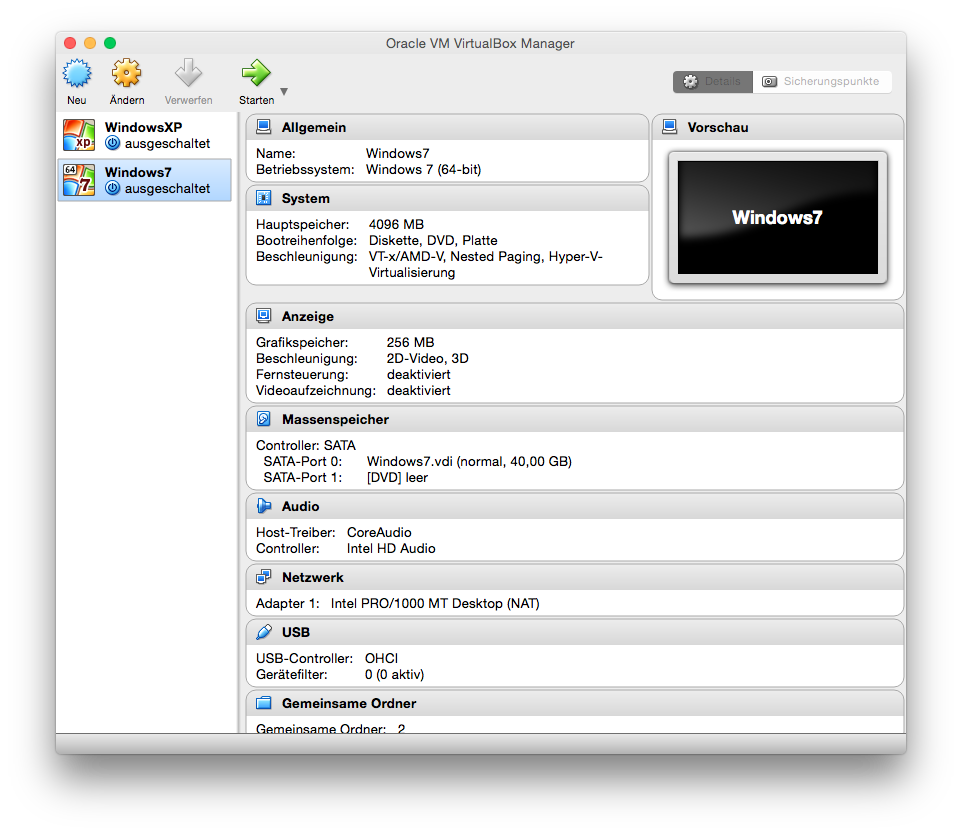
    2. If I start with -dev dx9 parameter, then the whole virtual machine crashes after displaying the start screen. If I start with -dev gl parameter, then I see the start screen of Visionaire, but it is extremely slow. It needs 4 seconds to see the highlighting of a button for example. It seems Visionaire slows down the complete machine. The memory usage with 14 .... 40 MB and the CPU usage with 7 .... 10 %  seems low and normal. Normally, playing 3D games with DirectX in the virtual machine is no problem...
  • #77, by SimonS 9 years ago Zitieren
    Just installed Win 7 in Virtual Box and all was working well with -dev gl, -dev dx9 looks broken but you can use it. So it's probably not Visionaire's fault. How much video memory have you assigned to the vm ?
  • #78, by sebastian 9 years ago Zitieren
    what Version of opengl is installed?  Maybe the graphics driver only needs an update
  • #79, by Lebostein 9 years ago Zitieren
    Just installed Win 7 in Virtual Box and all was working well with -dev gl, -dev dx9 looks broken but you can use it. So it's probably not Visionaire's fault. How much video memory have you assigned to the vm ?
    4 GB RAM, 256 video memory. Visionaire seems to require little memory. Have you installed directX separately?
  • #80, by afrlme 9 years ago Zitieren
    Just installed Win 7 in Virtual Box and all was working well with -dev gl, -dev dx9 looks broken but you can use it. So it's probably not Visionaire's fault. How much video memory have you assigned to the vm ?
    4 GB RAM, 256 video memory. Visionaire seems to require little memory. Have you installed directX separately?
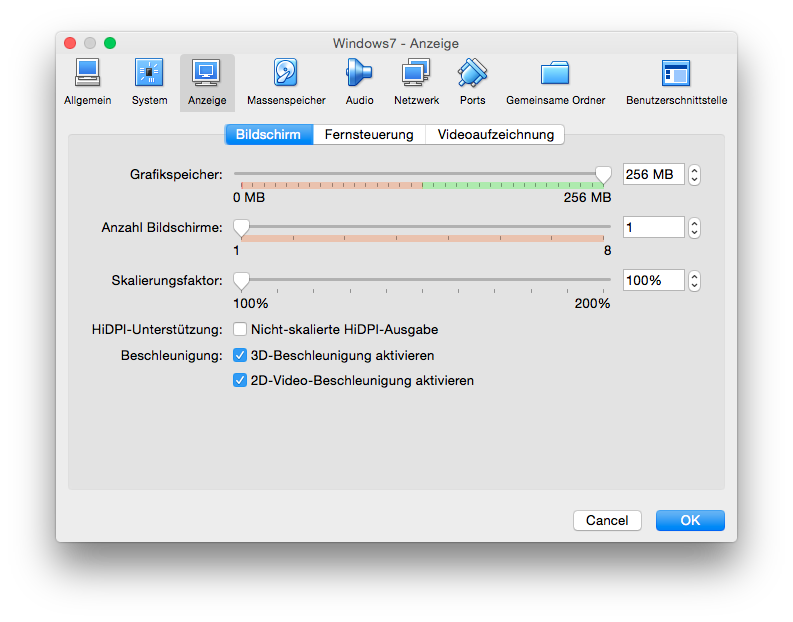
    512 VRAM is the minimum recommended, but the mac mini I have is somewhere around what you have too. Not tried vs 5 on it yet & unfortunately probably won't be able to any time soon as rest of my family have been temporarily using it for streaming uk tv & watching movies on lately - should probably look into one of those firestick/box things so I can reclaim it.

    P.S: have you tried using a different VM? I use Parallels, which is what I believe David (BigStans) also used for testing windows stuff as he's a mac user like you.
