Login / Registrieren
DE EN FR ES IT CZ
Zurück Nach oben

Set Pause For Each Frame

  • #1, by theokou 13 years ago Zitieren
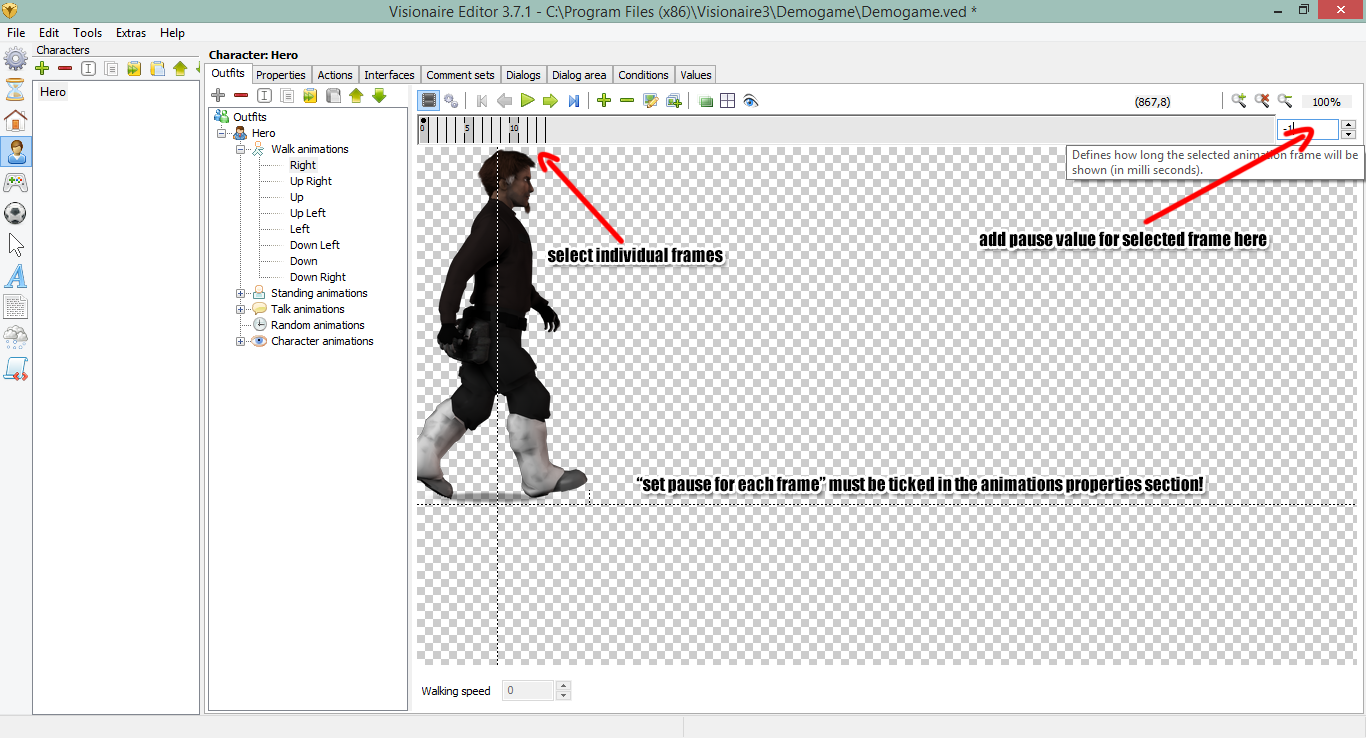
    There is a "Set Pause For Each Frame" option on the Properties tab in the Outfit tab of a character. How do I set the time I want each frame to be paused? I searched and didn't find anything. Thanks!
  • #2, by afrlme 13 years ago Zitieren
    here you go wink
  • #3, by theokou 13 years ago Zitieren
    Lifesaver!
  • #4, by afrlme 13 years ago Zitieren
    no problem wink
  • #5, by andiliddell 12 years ago Zitieren
    Is there a quicker way to apply a certain pause length to multiple frames.

    I so often have to do complex work-arounds, when in actual fact, All I want is to play the first bit of an animation, pause on one frame for a few seconds, trigger an action, continue playing at the normal rate... pause again on a frame for a second, then continue playing again.

    Am I missing something or do I really have to set the pause time for EVERY SINGLE frame, when I select this? Rather than multi selecting them?

  • #6, by afrlme 12 years ago Zitieren
    I've added something in regards to this to the tasklist for a future feature/improvement. I think instead of only having the option to set a global pause value or the pause value for every single frame that we should have the option instead to set a global value & tick an option on the frames that we want to set a different value on. It would be much more intuitive & faster than typing out the pause value for every frame.

    Hopefully the devs will be willing to sort it out for 4.1 or for upcoming release with bug fixes of 4.0 final. (fingers crossed)
  • #7, by Alex 12 years ago Zitieren
    changed it so the animation pause is used if the individual frame pause is not set (-1 = default).
  • #8, by afrlme 12 years ago Zitieren
    To clarify: you mean that if the value is left at -1 then it will use the global pause value set in the option tab? else it will use the value we set in the text input box?

    If so then, that will work, cheers. wink
  • #9, by Alex 12 years ago Zitieren
    yes, that's correct
  • #10, by afrlme 12 years ago Zitieren
    Nice smile

    I was actually thinking of it being something like that a while back & then I forgot about it... (bloody fish memory) grin
  • #11, by andiliddell 12 years ago Zitieren
    Perfect, big thanks Alex! this will allow me to use this method for timing actions much faster!