Login / Registrieren
DE EN FR ES IT CZ
Zurück Nach oben

Object stops responding to "move object to"

  • #1, by qamillo 10 years ago Zitieren
    Hi again. I'm trying to finish my very own version of advanced menu, but I stumbled upon another problem related to moving the object, which is marker at volume indicator.

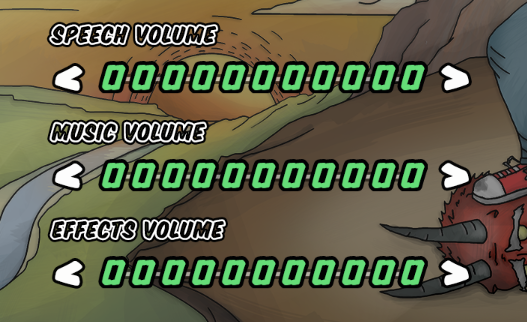
    I have volume indicator with green marker object and up / down buttons, it looks like this (displayed value [object text - area back] is for debugging):

    PIC1

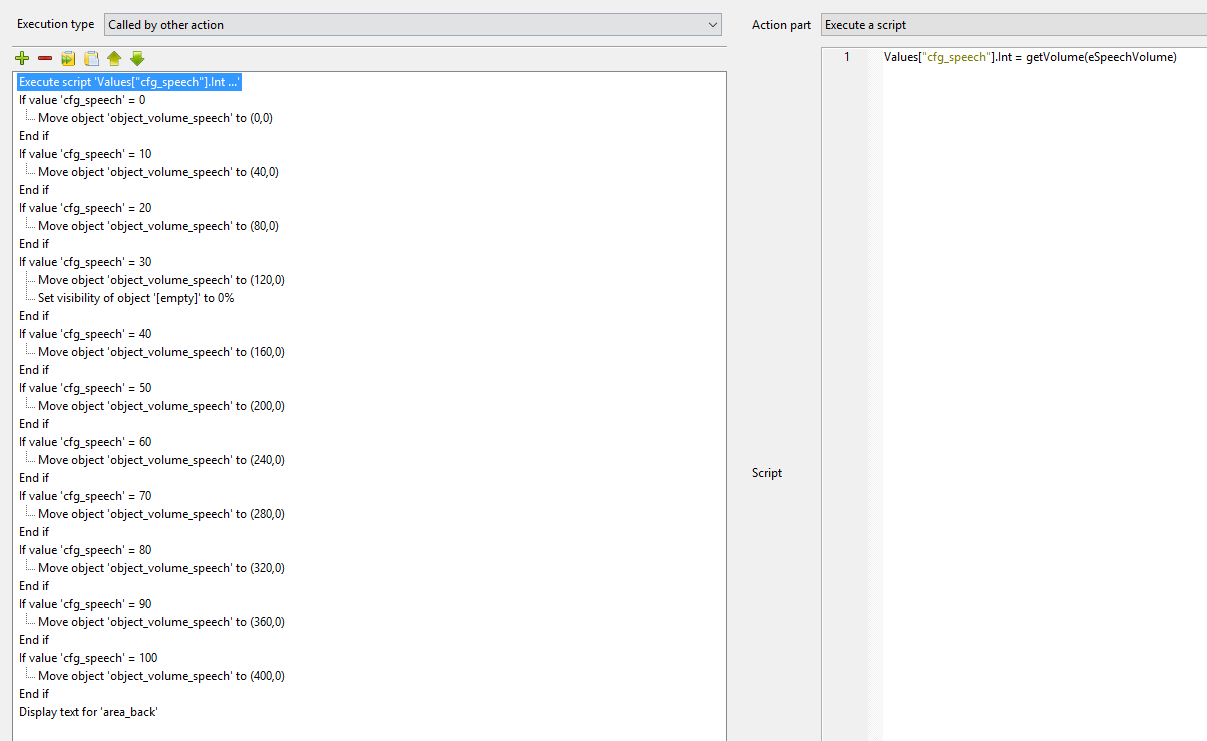
    At the begining of the scene and after up / down action I call "speech_update" action - it works like switch (I get volume as a value [cfg_speech] and then move object to position):

    PIC2

    This works great at the first time and after up / down volume change. However, after another settings open, green marker is always on 0,0 positions and it looks like this:

    PIC 3

    I really don't know what is wrong. Maybe I created too "fancy/stupid" method for this? ; /

    PS. Set visibility is only for test - don't bother on this one.

    EDIT: Here is some short clip with this problem: https://sendvid.com/81adokog

  • #2, by sebastian 10 years ago Zitieren
    Can you also post the script where you srite the new value to the config?
  • #3, by qamillo 10 years ago Zitieren
    It's straight from: https://wiki.visionaire-tracker.net/wiki/Read/Write_Config.i...

    Config writing works fine. This problem appears only when I'm still in game and come back to the settings screen. Debugged value ("50" in pics example) is always up-to-date. Just this green marker goes to default 0,0 position.
  • #4, by sebastian 10 years ago Zitieren
    So the uodate action is called everytime but seems not to reposition the object?
    What happens when you add a short pause before?


  • #5, by qamillo 10 years ago Zitieren
    Yes, update action is called in every necessary case. I tried with pause, but it do nothing really.

    Maybe I record a clip how it looks in-game?
  • #6, by qamillo 10 years ago Zitieren
    Here is some short clip with this problem: https://sendvid.com/81adokog
  • #7, by afrlme 10 years ago Zitieren
    Are you calling the action inside of an at begin of scene action too? It won't automatically remember the position because the move object to action part is offset based, it's just offsetting it from the default position. The new position is not written into the data / save files.
  • #8, by qamillo 10 years ago Zitieren
    Hmmm I think so, but have a look please: PIC4 in attachment

    (this works for first settings launch, then it stops)
  • #9, by sebastian 10 years ago Zitieren
    You could try and build something with animations and moving them. the object area would be the whole slider area (where ever the handlencan move)
  • #10, by qamillo 10 years ago Zitieren
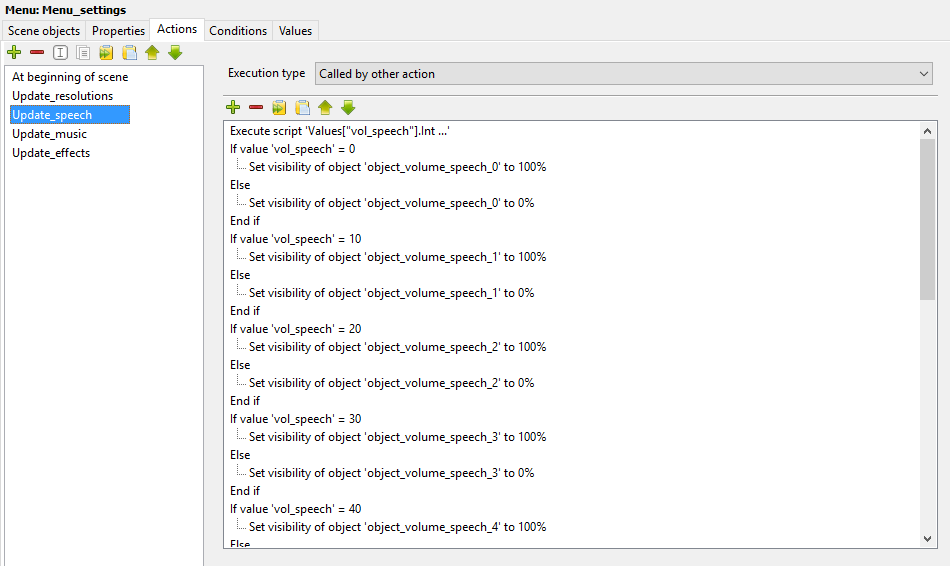
    I did it in a hard way - switching object visability between 11 marker objects (all use same graphics. Works fine and "reads" actual volume every time. Some screenshots in attachment (editor view with all 33 markers & example of switch action). smile

    I was afraid that this solution will take more RAM, but... it's even lighter than with move object idea. smile
  • #11, by sebastian 10 years ago Zitieren
    Cool solution though.