Menu
Login
Language
DE EN FR ES IT CZ
Back

mouse pointer missing despite being in settings help me

  • #1, by blendforest-games Wednesday, 10. February 2021, 09:23 5 years ago Quote
    have everything set actually, maybe you can look into source code see file. Where my thinking error is? Used only for a short time. Thanks a lot in vouraus.

    frozenpunk.com/bendy.zip

    Newbie

    3 Posts

  • #2, by esmeralda Wednesday, 10. February 2021, 10:13 5 years ago Quote
    I can't see if your cursor is showing in the editor, because you only uploaded the .ved without the assets. (keep in mind that the assets need to be in the same folder (or in subfolders) as the game file)

    But if you have - as far as I can see, there is just a menu in the game right now, no scenes.
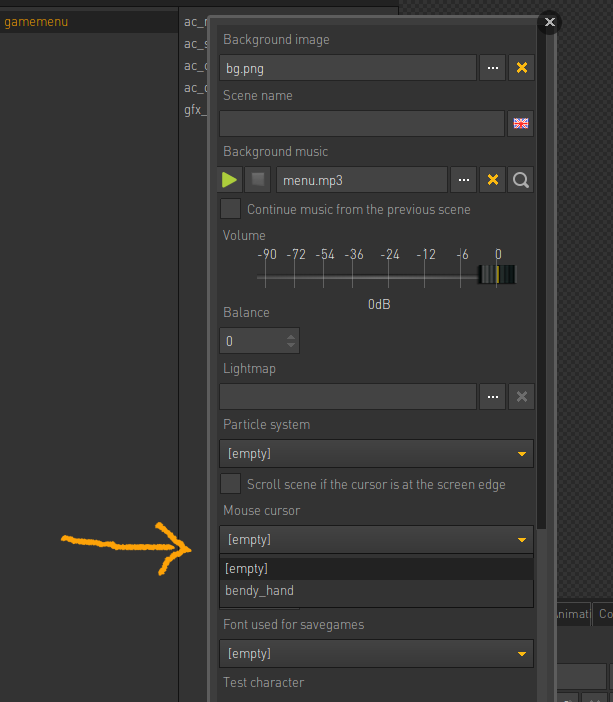
    Try setting the cursor in the properties of the menu. (see image) As far as I remember it should default to the game cursor in menus, but mabye this helps none the less.


    Key Killer

    567 Posts

  • #3, by afrlme Wednesday, 10. February 2021, 12:28 5 years ago Quote
    Yes, you need to manually specify the cursor via the properties section for menu type scenes. For regular scenes it will use the cursor belonging to the command interface you should have assigned to your playable character.

    Imperator

    7290 Posts

  • #4, by blendforest-games Wednesday, 10. February 2021, 12:49 5 years ago Quote
    thank you 

    Newbie

    3 Posts