Login / Registrieren
DE EN FR ES IT CZ
Zurück Nach oben

Mac osx saving issue

  • #1, by gabarts 9 years ago Zitieren
    I'm switching between windows and mac, this last one mainly for testing purpose and some quick modifications. This evening I opened the saved project file which was perfectly working on windows. The first run all was fine, I've made some corrections and saved the project. Now one character standing in a scene is gone, literally gone smile

    Now since I think it's a config.ini saving bug, because on windows for example when I do lot of changes the game need to be refreshed and I delete the config.ini folder under app data and then all is working again.

    I think may be related to this problem also on Mac, where is this folder? What can be this issue?

    SOLVED [I rebooted macbook and opened the original project file, working again. I've changed parameters to character stand at object and then saved and then issue occurred. Weird thing is that I've downloaded again the project from my drive and the problem was still there, that's why I posted as mac osx saving issue]
  • #2, by esmeralda 9 years ago Zitieren
    Are you starting your game form the beginning or from a saved game?
    I had the same problem (vanished character) in windows when starting the game from an savegame after changing something in the game. I.e. starting from an old savegame.

    EDIT: too late :-)
  • #3, by sebastian 9 years ago Zitieren
    I think may be related to this problem also on Mac, where is this folder? What can be this issue?
    regarding this:

    config.ini and savegames:
    /Macintosh HD/Users/yourusername/Library/Application Support(/youcompanyname)/yourgamename/
    game log file:
    Macintosh HD/Users/yourusername/Logs/(/youcompanyname)/yourgamename/
  • #4, by gabarts 9 years ago Zitieren
    Thanks
  • #5, by SimonS 9 years ago Zitieren
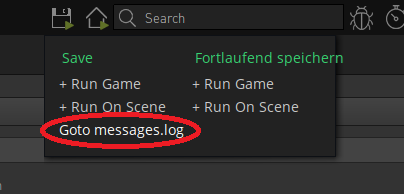
    You can also reach the game settings folder by this:


  • #6, by sebastian 9 years ago Zitieren
    ah, by the way... on macOS the messages.log is not in the game folder but in the Users /Library/Logs/<gamename>/ folder. Its linked wrong here...
  • #7, by joemid 9 years ago Zitieren
    ah, by the way... on macOS the messages.log is not in the game folder but in the Users /Library/Logs// folder. Its linked wrong here...
    Ha!  Thanks for that!  I was a little confused- but all better.  wink
  • #8, by gabarts 9 years ago Zitieren
    @esmeralda

    No, the problem occurred starting from the already edited project on windows and I had no savegames active. I modified some parameters and then saved on mac. The only solution was rebooting and then the problem was gone.
  • #9, by gabarts 9 years ago Zitieren
    Hello everybody,

    still I have to locate the config.ini folder on Mac osX...
    at the path suggested by Sebastian I can't find anything...

  • #10, by sebastian 9 years ago Zitieren
    Hello everybody,

    still I have to locate the config.ini folder on Mac osX...
    at the path suggested by Sebastian I can't find anything...
    the link i mentioned before is for the messages.log wink

    config should be here:  /Library/Application Support/(companyname/)gamename/ config.ini

  • #11, by gabarts 9 years ago Zitieren
    Ok, have you already had a look at the project file? That interaction bug...