Login / Registrieren
DE EN FR ES IT CZ
Zurück Nach oben

How to examine NPC character ?

  • #20, by wimf 9 years ago Zitieren
    Thank you sebastian

    I have verify this and my xml is correct. I have the same values.....

    But the problem is same.

    If i fly my mouse cursor on character, the name of character is not show

    is it possible that there is a setting so that in vs, the name of the characters are not displayed when we fly over with the mouse, that I will not have activated?
  • #21, by sebastian 9 years ago Zitieren
    The current set command needs to be usable on objects and characters. You mentioned before that its setup like that. Also the problem occours only on characters which are created in VS5. Im not sure where to search further. Seems that there is a difference between them in your project.
  • #22, by Machtnix 8 years ago Zitieren
    Maybe try the name without blanc - neither in the folders nor in the game itself. Visionaire doesn't like blanks so much... But I haven't any idea if it works.

    Sorry, my French is poor... wink
  • #23, by wimf 8 years ago Zitieren
    Thank for your answer sebastian and Machtnix

    Machtnix, i have tested this but not work ... it is a hard problem for me. I don't understand where is the problem
  • #24, by Nigec 8 years ago Zitieren
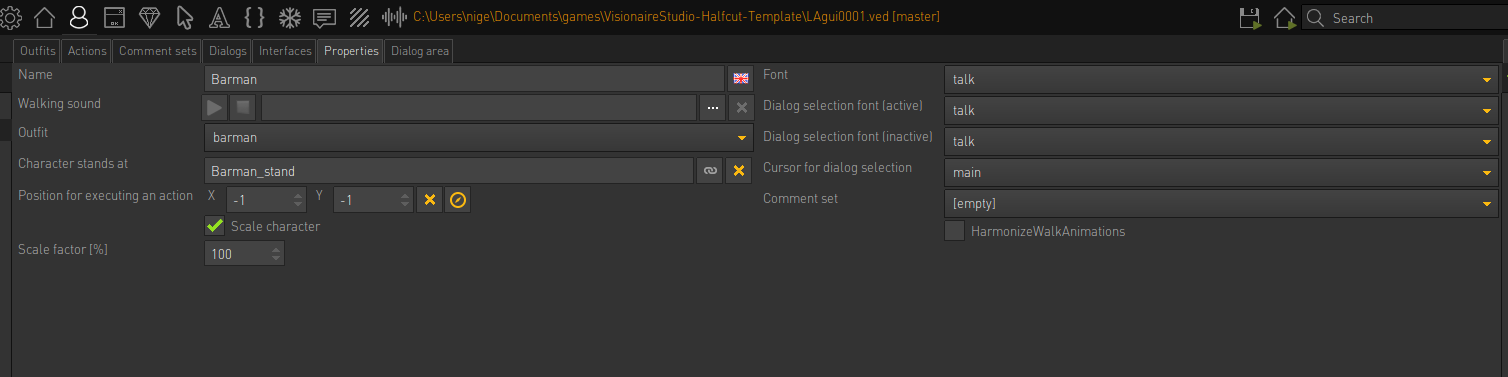
    its working for me BUT its an old project, so maybe something's changed, this is the characters settings

    its the driftwood template which uses the MI1 UI, I've added the file but I'm not sure if that one is fixed, it used to crash because of the mp3 sound files but you can see my npc

    edit, there is a lot of "unnamed" listed and the barman is one of em

  • #25, by wimf 8 years ago Zitieren
    thank you for your file. I'm going to study this to see what's wrong with my project
  • #26, by Machtnix 8 years ago Zitieren
    I guess there are wrong table entries in VS 5. Something one can't solve as user ...