Login / Registrieren
DE EN FR ES IT CZ
Zurück Nach oben

Feature Request: Simple “Greyboxing / Color-Boxing” Tools for Faster Scene / Object Prototyping

  • #1, by harcomo 3 weeks ago Zitieren
    Hi everyone,

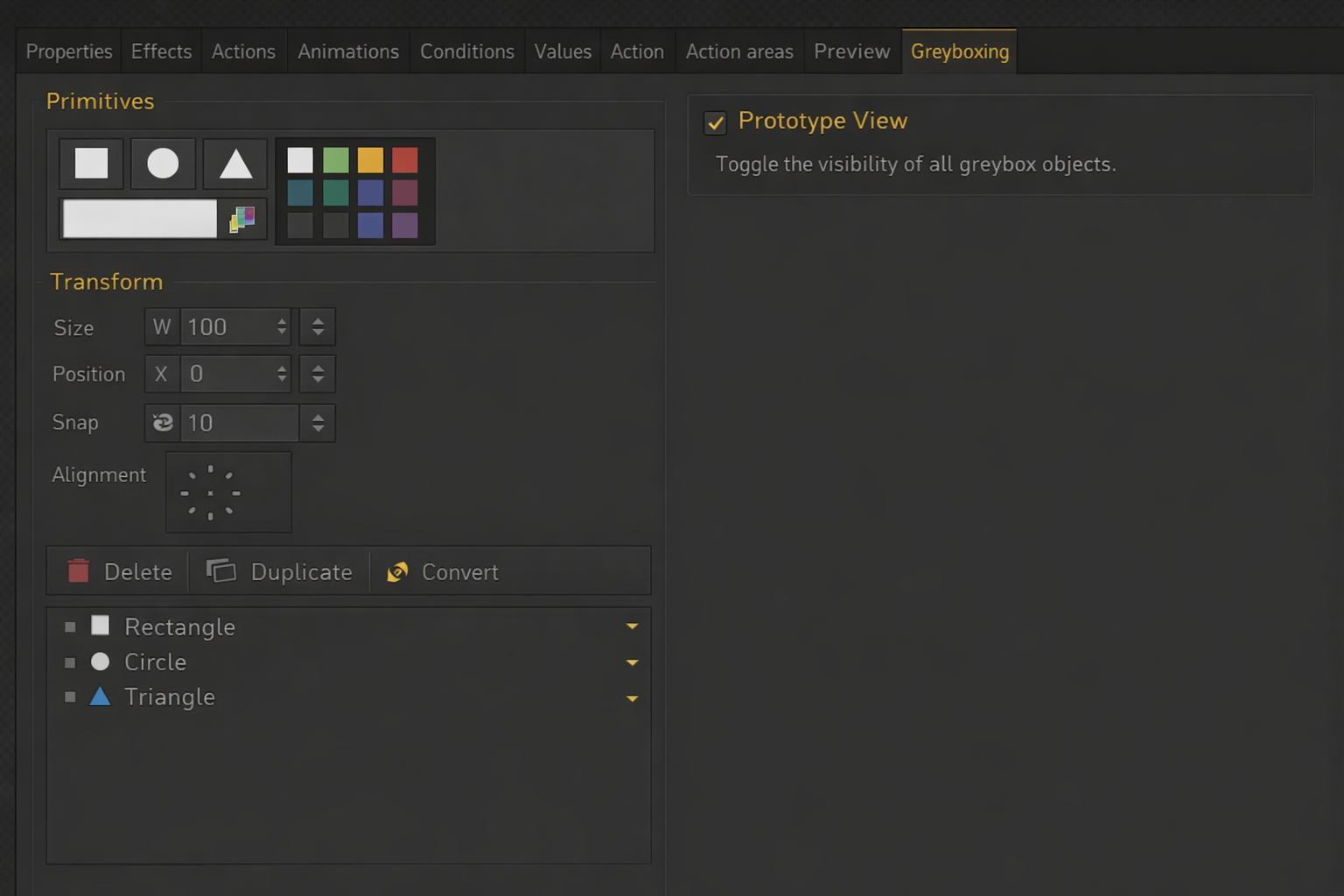
    I’d like to suggest a feature that could significantly improve the prototyping workflow in Visionaire Studio 5: basic greyboxing / color-boxing tools directly inside the engine (see picture).

    Right now, when I design scenes, I often want to quickly prototype layouts, compositions, and interactions. However, I’m slowed down by the need to switch to an external program like Photoshop or Krita just to block out simple shapes.

    My current workflow looks like this:
    1. Sketch or block a scene in Photoshop/Krita
    2. Export assets
    3. Import them into Visionaire
    4. Later replace or adjust everything again when refining the scene

    This back-and-forth makes rapid iteration difficult (complex multipart-objects in scenes), especially in early design phases.

    It would be extremely helpful to have a lightweight in-engine toolset that allows:
    • Creating simple primitive shapes (e.g. rectangles, circles, triangles)
    • Resizing and positioning them directly in the scene
    • Assigning basic colors (fill + maybe outline)
    • Treating them like temporary scene objects

    This would allow quick “whiteboxing” or “greyboxing” of scenes without leaving the engine.

    ___________________________________________________________________________________

    Sure you could just create a standard folder of colored placeholder shapes - but, how lame is that? 
    For me personally, this would make the workflow in Visionaire Studio much more efficient and enjoyable - Faster iteration during early design, better focus on layout, composition, and gameplay flow, less dependency on external tools for simple tasks, more fluid creative process overall

    You could add also a toggle between “prototype view” and final assets, simple snapping / alignment tools
    Ability to later replace primitives with real assets

    Thanks for considering this! I’d love to hear if others feel the same or have similar workflows.


  • #2, by afrlme 3 weeks ago Zitieren
    Isn't that something you'd mostly use in 3D game development to help quickly prototype complex/large levels &/or maps, etc?

    I'm not really sure I see much use for it in a 2D point & click adventure game engine. Most people that use placeholders usually mock up a scene first in photoshop or whatever they use then import all of their layers into Visionaire Studio & start putting their scenes together - either way you look at it, you will end up having to rework things one way or another as you progress & replace things. Game development is full of tedious repetitive work.

    Anyway, I'm not sure if Simon would be willing to implement something like that, but feel free to join our Discord server & put in a request in the request-feature channel. You never know, he might decide to implement it at some point, but for now you could actually just do what you said & create some basic shapes as images & import them because you can actually scale, rotate, & position the images you assign to objects directly in the VS editor by selecting the object & clicking on the components tab & creating a transform component. I don't think you can tint them, except via the use of masks or by applying a light map to them. Characters on the other hand can be tinted via light maps, masks, or directly via scripting.

    Also, before I forget, you can also toggle the sprites/animations linked to scene objects on & off or adjust their opacity in the editor via the preview tab on the selected object. It doesn't hide them in-game mind, just the editor. To hide things in-game you need to add a condition or value to the properties tab beloning to the object to control whether the object is active/visible or inactive/hidden. Alternatively you can adjust the visibility (opacity) via an action part, but that doesn't prevent the object from being detected by the cursor.