Login / Registrieren
DE EN FR ES IT CZ
Zurück Nach oben

Blinking

  • #10, by ivan-parketov 5 years ago Zitieren
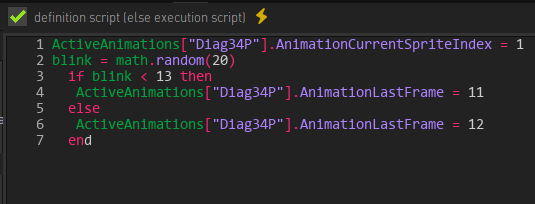
    Hello. I used the blinking tutorial, but the result was not random. I thought that the character will blink once out of three, but he blinks or does not blink constantly until the animation changes. I tried to make the function math.random() recalculate the value every time the animtion loop starts, but it didn't work. What am I doing wrong?

    1. if ActiveAnimations["animation_name"].AnimationCurrentSpriteIndex == 1 then
    2. blink = math.random(20)
    3.   if blink < 13 then
    4.    ActiveAnimations["animation_name"].AnimationLastFrame = 11
    5.   else
    6.    ActiveAnimations["animation_name"].AnimationLastFrame = 12
    7.   end
    8. end
  • #11, by afrlme 5 years ago Zitieren
    Did you replace animation_name with the actual name of the animation?

    You also shouldn't need the first if query. Also you need to make sure that you specify the correct frame values for AnimationLastFrame.

    As for math.random() it's not necessarily going to blink one out of 3, it will return a random number between 1 & 20 based on your example, so it's a 7 out of 20 chance it will play the blink animation frames.
  • #12, by ivan-parketov 5 years ago Zitieren
    Yes, I changed it to general for the example.
    The number of frames is 12. The first 11 is breathing, 12 is blinking.
    7 out of 20 is about one in three blinking possibilities. But the problem is that there is no random. The character either blinks or not, until a random animation interrupts the standing.
    More details about the last. When I start the scene, the character stands and does not blink at all. If you wait for a random animation or walk around, then the character starts blinking constantly and does not stop even after subsequent interactions.

  • #13, by afrlme 5 years ago Zitieren
    Can you share some screenshots of how you have set it up please? I can't see any reason for it to be behaving like that.
  • #14, by ivan-parketov 5 years ago Zitieren
    Here you are, please
  • #15, by afrlme 5 years ago Zitieren
    I meant screenshots of how you set up the character blink animation & action block you have written the script into.

    Quick note: you don't need the first line of code.

    P.S: sorry for taking a while to get back. I'm not as active on the forum as I used to be. Most of us are on Discord as it's just more convenient for back & forth conversations & discussions.

  • #16, by ivan-parketov 5 years ago Zitieren
    Oh, I'm so unobservant. I found an error, it turns out I put the script in the wrong place.
    Thank you for your help.