Menu
Login
Language
DE EN FR ES IT CZ
Back

Text objects

  • #1, by tall-story-games Saturday, 03. October 2020, 12:56 5 years ago Quote
    Hi, I may be missing something obvious, but is there a way to create a text object on the screen? At the moment my menu screen is using PNGs for the buttons despite them essentially just being text. I'd prefer it if they were dynamic for translation and ease of editing.

    Thanks
    Tom

    Newbie

    42 Posts

  • #2, by SimonS Saturday, 03. October 2020, 13:42 5 years ago Quote
    Components / Text

    Thread Captain

    1622 Posts

  • #3, by tall-story-games Sunday, 04. October 2020, 15:04 5 years ago Quote
    Got it, thanks Simon!

    Newbie

    42 Posts

  • #4, by tall-story-games Sunday, 04. October 2020, 15:34 5 years ago Quote
    Hi again,

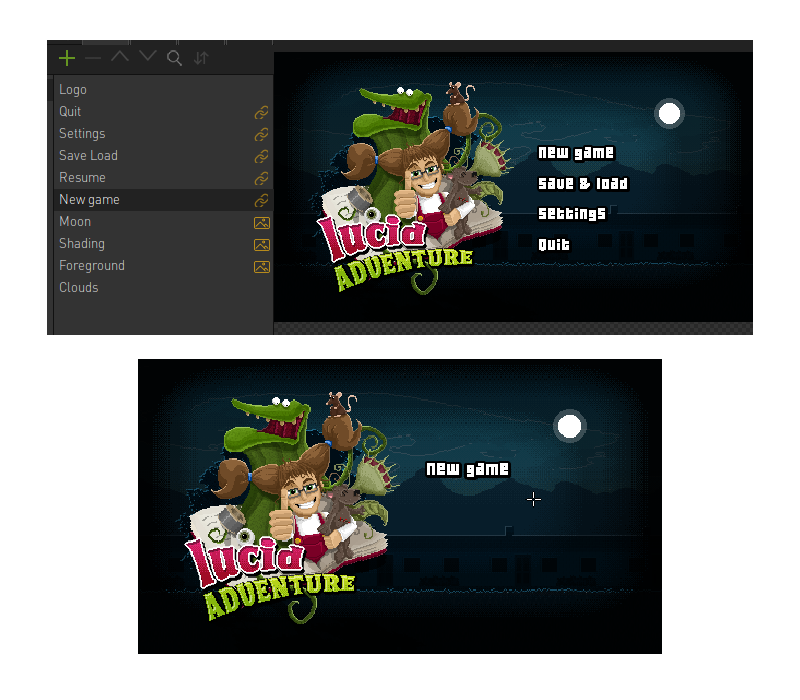
    I've managed to add the text components onto each of the objects in the scene successfully (see attached screenshot) but when I build the game, only the lowest object with a text component actually renders in the scene. If I drag a different object with a text component underneath it, that one will render instead.

    The object containers themselves are rendering fine. Their mouse and click events all work, and if I add an image to them, that appears perfectly too.

    What am I doing wrong? roll

    Cheers
    Tom

    Newbie

    42 Posts