Login / Registrieren
DE EN FR ES IT CZ
Zurück Nach oben

Text in interface

  • #1, by ke4 12 years ago Zitieren
    Hi,

    i have one new bug, if i open my interface, and click on something on what my character start talking, the text is damaged.
    Here is video how it looks.

    http://youtu.be/a8mhOp6eaaU

  • #2, by Dilated 12 years ago Zitieren
    Is the issue that the text scrolls up? Would you like the text too appear on the bottom?
  • #3, by Alex 12 years ago Zitieren
    you should give us more information. what are your interface properties? did you define an interface border? why did you implement this as an interface and not as a menu screen? what do you want to achieve? what is the exact issue?
  • #4, by ke4 12 years ago Zitieren
    The text should be always at the bottom of the screen, you can see that for a while just before opening the book. So It's on the wrong place + it's moving up and then it's not showing at all. ( it was working in RC version )

    Well i actually dont remeber now why i did this as interface instead of menu screen // in menu i cant use display text by character

    It has 5 pages and i wanted to player can open this wherever he is.
    i did not anything with interface border.


  • #5, by Dilated 12 years ago Zitieren
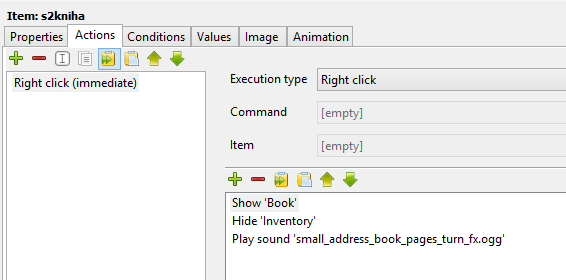
    Can you please screenshot the actions for the item? Specifically the one that opens the interface your having issues with?
  • #6, by Alex 12 years ago Zitieren
    basically the interface is an overlay image over the current scene (for displacement 'absolute' or 'current cursor position'). If you didn't define any interface borders, the mouse click is the same as without the interface. So the character walks to the clicked destination. That would be my guess.

    First I'd recommend to define interface borders (so the mouse click is handled by the interface and not on the scene) or maybe better change displacement to top and make the interface as large as your resolution. Or alternatively use a menu screen. With a menu the current game is paused (all animations and actions) when you switch to the menu.

    Further I'd use a narration text and not a text spoken by a character (which you don't see if your character is hidden).
  • #7, by ke4 12 years ago Zitieren
    I actually have set displacement TOP.
    I tried now use narration text, it does the same.
    So to define interface borders you mean by the ofset option?
  • #8, by afrlme 12 years ago Zitieren
    No he means by selecting the create and edit interface area button in the preview window & then drawing the borders around the edge of your interface, just like you do when you create object areas.

    The button is the one next to the blue square icon.

    Another useful reason to set interface area is that it will only show interface objects/images inside of the interface area which means you can have images outside of the interface that can be slid in over time such as a progress bar or something else similar etc...
  • #9, by ke4 12 years ago Zitieren
    I see, this i had set too :/
    So it's weird, everything should work fine
  • #10, by Dilated 12 years ago Zitieren
    Not sure if this will work but possibly try setting the displacement of your interface to 'Current cursor position' I currently have mine set that way (It also covers the whole screen), and it automatically centres it and they work as expected in terms of text placement.
  • #11, by ke4 12 years ago Zitieren
    That works! :-) thanks mate
    but still i think its some bug probably, this worked before.