Login / Registrieren
DE EN FR ES IT CZ
Zurück Nach oben

Software nicht nutzbar - Grafikfehler schon in den Menüs

  • #1, by decay 13 years ago Zitieren
    Hi,

    ich habe heute die Freeware Version installiert und wollte gerade ein bisschen "schnuppern" und das eine oder andere Tutorial spielen.
    Das Programm startet ganz normal, und solange ich nicht links im Hauptmenü einen anderen Reiter auswähle (Kulisse etc) kann ich das erste mir sichtbare Menü auch vollständig nutzen. (Siehe Bild "1")

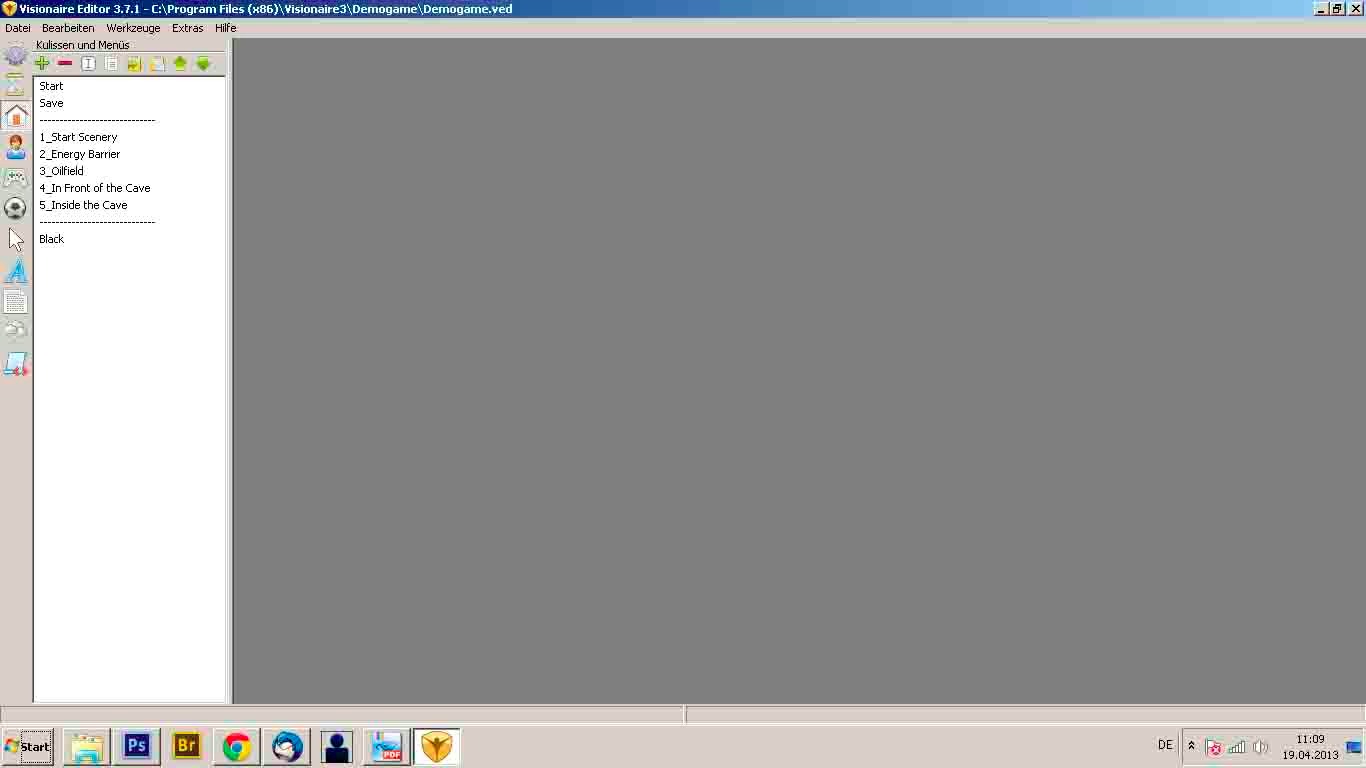
    Der Klick auf zB "Kulissen und Menüs" führt zu dem Ergebnis dass zwar weiterhin der linke Bereich der Software nutzbar bleibt, aber auf der rechten Seite, auf der eigentlich ein neues Menü entstehen sollte, ist nur Grau zu sehen. (Bild "2")

    Um zu verdeulichen in welcher Form sich die Software damit offensichtlich aufhängt habe ich das Fenster ein bisschen bewegt und man kann deutlich sehen, dass hier ein knackiges Problem auftritt ("3").

    Meine Frage: Woran könnte das liegen? Kennt jemand dieses Phänomen?
    Danke für jede Antwort! smile

  • #2, by afrlme 13 years ago Zitieren
    could you please post in English in a new thread? (if possible)
  • #3, by decay 13 years ago Zitieren
    of course!

    i just got the freeware version and was about to test it a little.
    the software works fine, as long as i dont click on any of the menu points on the left side. as soon as i do so - the right side of the sceen which is supposed to change by selecting the different menu points on the left, just gets gray. (as seen in the images)

    it apperas that the whole right side has crashed while the software still seems to be working - i just can't see anything except the menu points. (as seen in image 3)

    thats my problem smile
  • #4, by afrlme 13 years ago Zitieren
    could you provide some specs about your machine please?
    from what I can tell you are using windows 7 with all the features turned off in some kind of classic mode?

    & have you tried re-downloading the software & reinstalling to see if it didn't get corrupted somewhere along the lines?
  • #5, by decay 13 years ago Zitieren
    nope, ill give it a try right away.

    what specs do you want to know?
  • #6, by decay 13 years ago Zitieren
    reinstalled - didnt work.
  • #7, by afrlme 13 years ago Zitieren
    machine make, model, specs such as cpu, ram, vram, graphic card etc etc ...
    David or Alex might be able to pin point your issue - if it's hardware related.

    I've not heard of anyone else having your issues before but just in case I would recommend having a look around the forum or via the search system.
  • #8, by BigStans 13 years ago Zitieren
    Hi,

    sieht für mich nach Grafikkartentreiber-Problemen aus.
    Ich würde empfehlen den Grafikkarten Treiber neu zu installieren.

    Da wo die "Fehler" sind, sollte eigentlich ein openGL 2.0 Viewport angezeigt werden.
  • #9, by decay 13 years ago Zitieren
    AHA.

    Heureka, das scheint funktioniert zu haben.
    Seltsam, die Treiber waren aktuell, habe sie nur neuinstalliert und (im Moment?) geht es.

    Jedenfalls, danke für den Anstoß. smile


    It worked out fine, i had to reinstall the driver of my graphic card. (for whatever reason.)

    thanks alot!