
Login / Registrieren
DE EN FR ES IT CZ
Zurück Nach oben

Questions to "Build game"

  • #10, by Lebostein 11 years ago Zitieren
    Hm.... no log window is opening here

    If I use the internal console with tab + print log I can see a message, that a mp3 file could not loaded. Thats it. But can I get this log file as a text file outside?
  • #11, by afrlme 11 years ago Zitieren
    Yes if you can find it. Best person to ask where log files would be located on mac would be David (BigStans) - I don't have a mac, so I couldn't tell you.

    P.S: sometimes the log file is named differently depending on the os & the language you have the editor set to I think. On windows & editor in English the file is usually named messages with the extension .txt or .log.
  • #12, by Lebostein 11 years ago Zitieren
    I have found it! "find" + "grep" are very useful helpers on unix systems ;-)

    The log file is located at:
    /Users/User name/Library/Logs/Company name/Game name/messages.log
    

    I wonder why the "show log" in vis editor menu don't show this file... If I click on this menu, I see this file:
    /Users/User name/Library/Logs/Visionaire Editor/viseditor.log
    
  • #13, by afrlme 11 years ago Zitieren
    No idea. I made a request on the dev tracker a while back for a new kind of log system, as for people like me that script a lot & use the log for debugging require a more dedicated log system that auto-updates itself.

    What I suggested was a floating window split into 2, with the messages log in one section & the viseditor log in the other, with it either updating automatically every x amount of time or with some kind of listener that listens for new content.

    Personally I use the log a lot. Having said that, David has been working on a debugger system for Lua scripts, but I've not tried testing it out - I was waiting for it to be internally implemented into the engine itself. The last time I tried it, it required me to do various things to connect vs to zerobrane.
  • #14, by Lebostein 11 years ago Zitieren
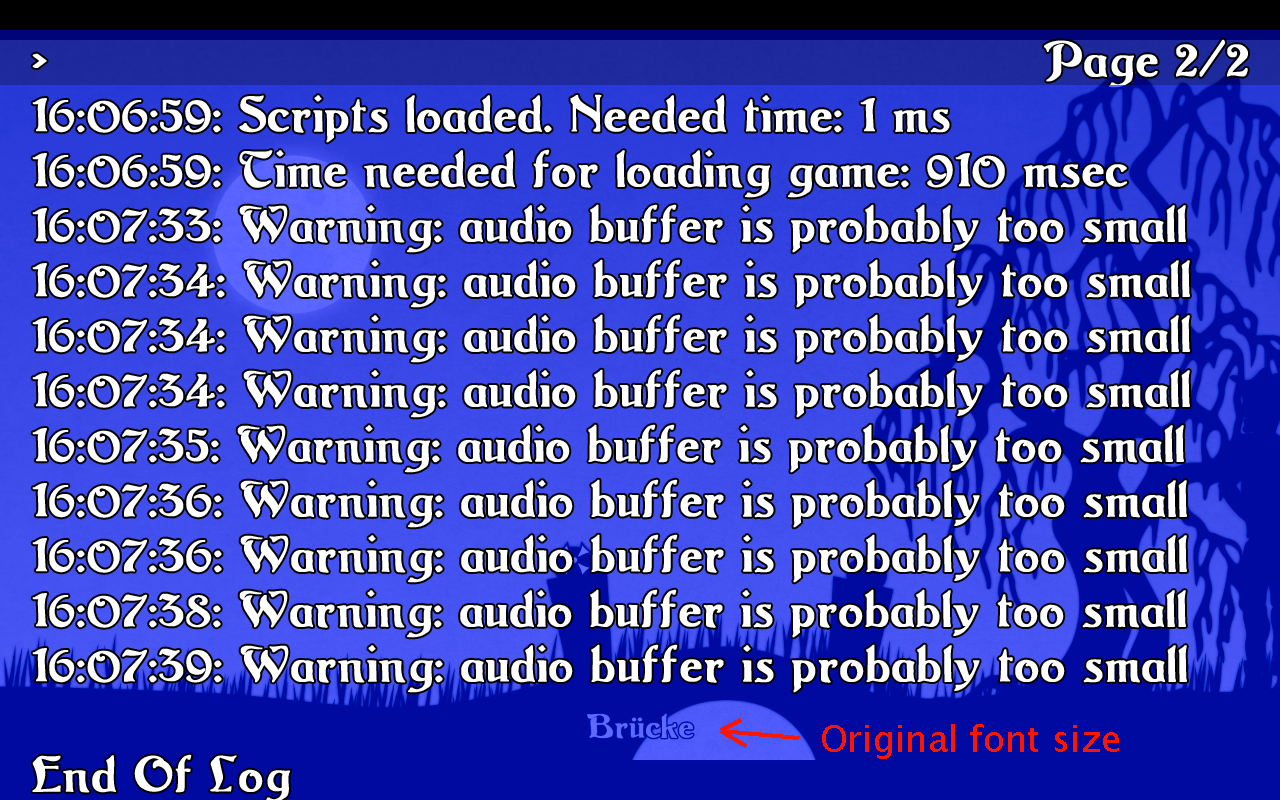
    That internal debugging thing with TAB is very useful! But the debugger font was not scaled down. My graphics are completely Full HD (1920 x 1080) but I play and test with 1280 x 800 pixel. So the font is very large:
  • #15, by afrlme 11 years ago Zitieren
    It uses whatever font is listed at the top of your font list.
  • #16, by Lebostein 11 years ago Zitieren
    On Windows the messages.log is in located in the same directory as the config.ini and the savegames are. This could be useful on Mac OS too. There is no need to use a special "Logs" directory.

    PS: What means: Warning: audio buffer is probably to small? It seems the engine has problems with many footstep sounds... Is it necessary to increase the sound buffer? How I can do that?
  • #17, by afrlme 11 years ago Zitieren
    No idea. Might be something to do with your audio card. Sound cards can only handle so many sounds at the same time or something or it could be to do with limitations of openAL.

    You should try a test maybe. Create a table in Lua of say 50 sounds & have it iterate through them in a loop & see if it triggers each one.

    Could be a mac thing, then again, it might not be.

    Only one of the devs can sort out the openAL source & buffer code in the engine.
  • #18, by SimonS 11 years ago Zitieren
    Please use the recommended formats: ogg/vorbis or ogg/opus. DON'T use mp3, it has licensing issues and might not work correctly.

    The tmp folder is a cache, if you are building the game, you can delete it afterwards.

    Custom icons are hard to implement, otherwise we would already have them wink

    The console uses it's own resolution (full current display resolution), so some fonts might be too big.

  • #19, by Lebostein 11 years ago Zitieren
    Custom icons are hard to implement

    I think on Mac OS you need only to replace the visplayer.icns inside the app-package with your own icon (with the same name). I would be happy If the build game dialog get a new line with the icon path that should be used (and if that line is Mac OS only, why not?). For windows exe an icon replace tool is recommended?
  • #20, by Lebostein 11 years ago Zitieren
    Please use the recommended formats: ogg/vorbis or ogg/opus. DON'T use mp3, it has licensing issues and might not work correctly.

    In the time of the warnings *.wav files only are played.
