Login / Registrieren
DE EN FR ES IT CZ
Zurück Nach oben

Questions about dialogue and text alignment.

  • #1, by Tymor 10 years ago Zitieren
    In dialogues that have a large amounts of text, how can I prevent the text from "spilling" out of the screen. This also goes from "show text by character" but currently I have solved this by dividing the text up into several "show text by character" actions. But how do you solve this for dialogues?

  • #2, by sebastian 10 years ago Zitieren
    Dont they go tobthe next line when they have no more place in the first?
  • #3, by Tymor 10 years ago Zitieren
    No, for some reason they don´t do that for me.
  • #4, by afrlme 10 years ago Zitieren
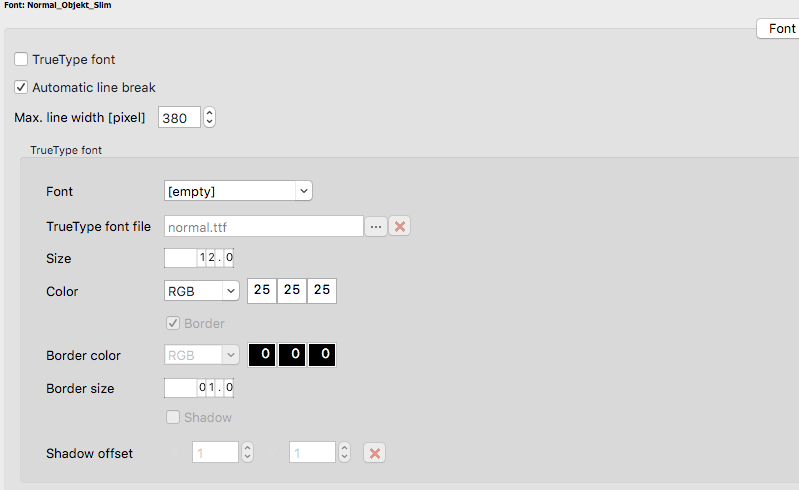
    You can limit the width of text via the properties tab for each font. I don't actually use it myself as I prefer to break the text down into multiple sentences. As for the dialog system... I hate it - it's about as old as a dinosaur. I've not actually tried, but with regular display text actions you can split the text into multiple display texts inside of the same display text action by adding a <p1000ms> tag (change time in ms to whatever you need or just use P if you want to make it left click to skip only) then adding more text after.

    https://gyazo.com/aa94c4a3322d40f2b48793304ba69b99
  • #5, by sebastian 10 years ago Zitieren
    Tick the "automatic line break" checkbox in your font settings:
    http://cl.ly/0N003x1P3i31/Image%202016-05-22%20at%202.43.16%20PM.png
  • #6, by Tymor 10 years ago Zitieren
    I experimented around a bit with your suggestions and was finally able to make it all look okay! It did take some doing, though. One failed attempt actually inspired me to make a character that speaks entirely in poems (lines got divided up until the text looked like freeform poetry).
  • #7, by afrlme 10 years ago Zitieren
    haha, well... at least the important thing - poetry or not - is that you managed to sort it out in the end. wink