Hi,
I think i´ve found a bug when comparing two values (Strings) using action part "If Value".
Comparing two different values, always return´s TRUE.
What am i doing?
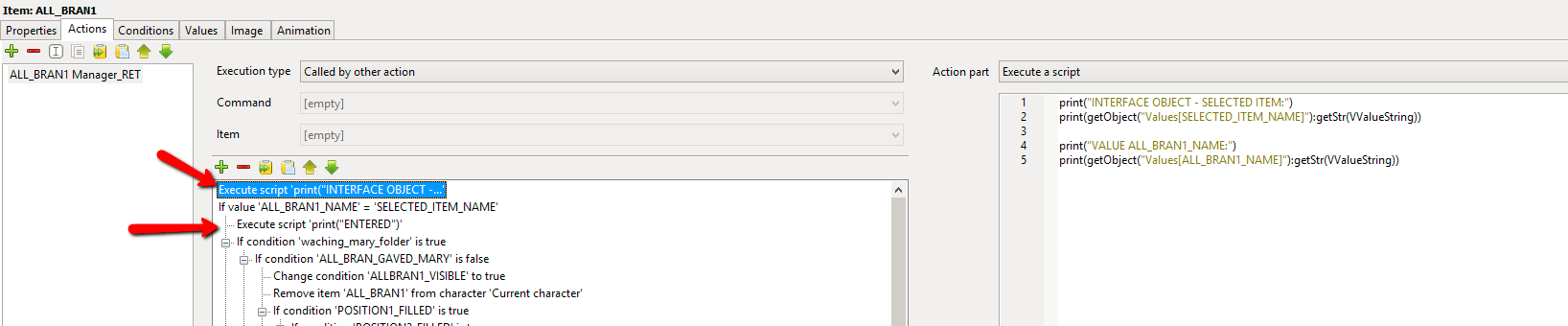
1 - I have an action in an item, called by other action in a scene object. In the beginning of the item action, i have this action part "If Value" that compares a value from item (with the item name) with a value from an interface. (ss1.png)
2 - I have inserted 2 script just to debug what values came to this point. One before the "if value" condition, just to print both string values i will compare. And the other just after the "if value" condition printing the word "ENTERED" to confirm that even with different values he enters in the condition. (ss2.png)
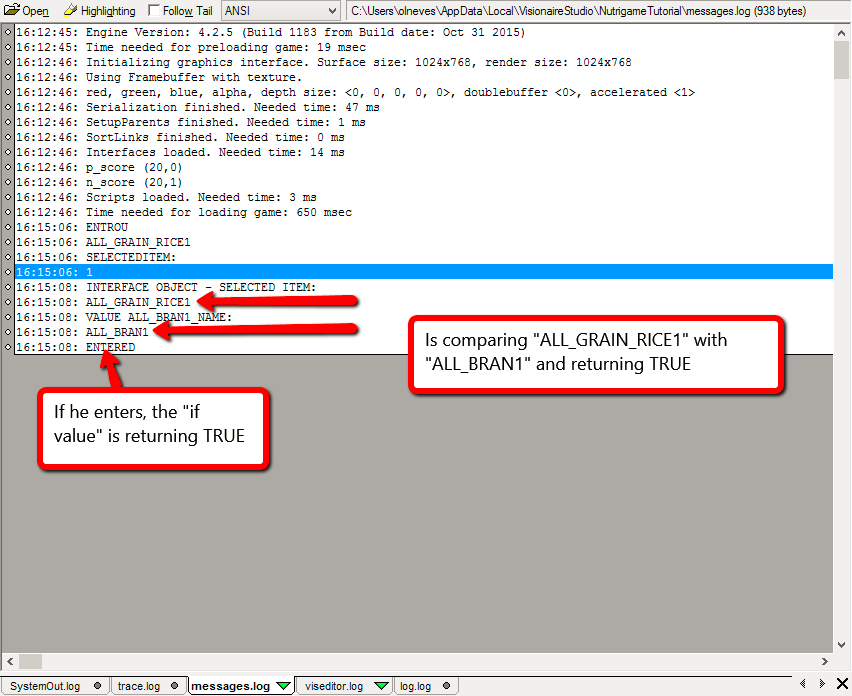
3 - Run the action and look at the log an analyse those prints. (ss3.png)
After those steps i´m able to conclude that two different string values are being compared and they return true. Is this a bug or what am i escaping here?

Best regards,
Orlix




 ) the in-editor version only compares the integer values. If you want to return true or false in the editor then you could create a condition that you update in an execute a script action prior to the if query. In the execute a script action you could add something along the lines of this...





