Login / Registrieren
DE EN FR ES IT CZ
Zurück Nach oben

Manual linebreak ?

  • #1, by Jorkz 6 years ago Zitieren
    Hello everyone!

    So, first of all, sorry for all these questions in a few days but every time I tackle a specific point I encounter a specific problem roll

    I think this one is less: I'm just looking for the solution for a linebreak when using a .ttf file.
    What should I do in the display text section to tell VS to make one? (because the automatic doesn't seem to work for me, moreover it's in French language and it doesn't recognize accents).

    Thanks.
  • #2, by tudor-stamate 6 years ago Zitieren
    Hmmm so just using Enter does not work?

    Try using \n or maybe editing the text from the Texts tab.

    Good luck.
  • #3, by Jorkz 6 years ago Zitieren
    hehe it works !
    I don't know what you called "the text tab" but I made a copy/paste from a .txt document.
    And it comes back to the line when I press enter.
    It's kind of weird because yesterday when I pressed enter it was showing me < / br >.

    So here's the thing, I don't know if it's your doing, since I changed the typography 20,000 times last night... But thank you sooooo much ! smile
  • #4, by Machtnix 6 years ago Zitieren
    Do the editor recognize accents by copying it from sign table (in German: Zeichentabelle)? It's a forgotten tool not automatically installed. Starting from Win7 I think it's lost... roll I got it from XP and it works.
    Or use the ASCII-code? F.e. alt + 0130?
  • #5, by tudor-stamate 6 years ago Zitieren
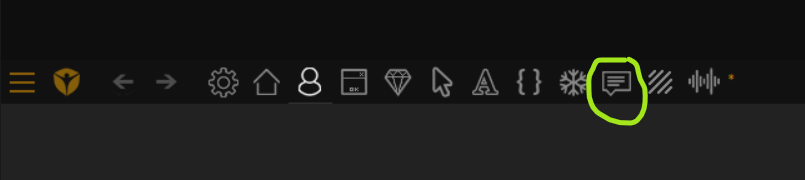
    By Text tab I meant the 10th on the upper bar. Attached a picture with it.
    In it you can view all texts entered in your project and can easily edit them as well as their translations.

    Anyhow, yes, copy/paste is the best way in my opinion. It keeps accents and linebrakes and everything.

    As far as supported characters... I think it supports pretty much everything. I'm sure German is supported 100% since the software is made by a German company, haha.
  • #6, by Jorkz 6 years ago Zitieren
    Thank you, again ! wink
  • #7, by Machtnix 6 years ago Zitieren
    As far as supported characters... I think it supports pretty much everything. I'm sure German is supported 100% since the software is made by a German company, haha.
    I think, it isn't pretty sure. Using an ä or an é isn't planned by English scripts. But all code languages and systems are English. As a German programmer you have to do a lot of tricks, using strings or sth.. F.e.: file names with ä (does an translating for "umlaut" really exist..?) or with spaces don't work well. Try it... smile
    I think, variables with ä or ö don't work neither... You can't name "schön == true" or sth like this.