(german below)
Hello all you helpful people!
I have the following problem:
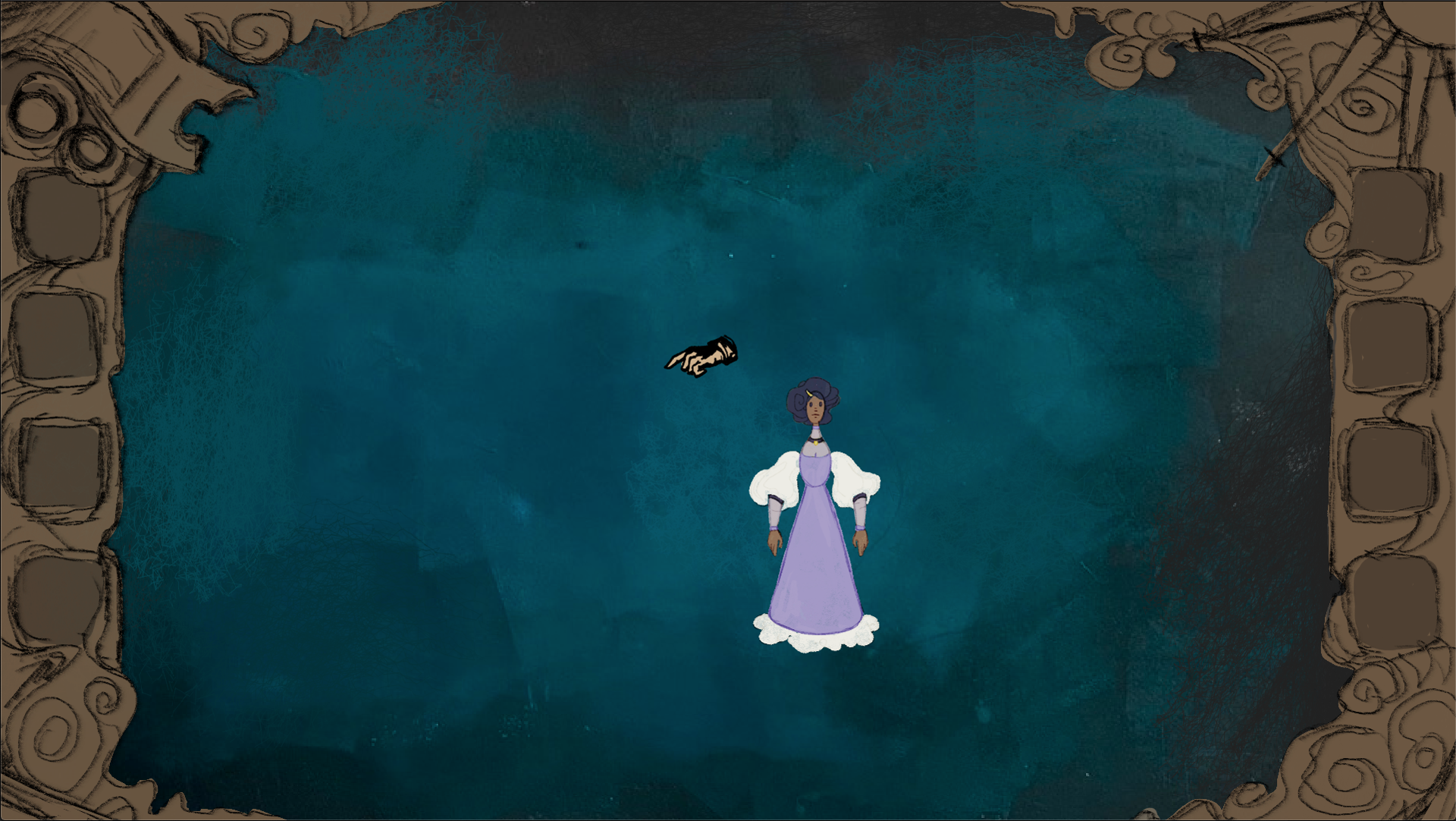
I would like my inventory to be permanently displayed as a frame at the edge of the screen. See picture 1.
Now, after a lot of frustration and "why doesn't my character move, why don't left-clicks work anymore, why is no text displayed", I've found out that my inventory is actually to blame, as this blog entry with the reverse problem makes clear:
https://www.visionaire-studio.net/forum/thread/blocking-back...
The problem is that when the PNG of the inventory frame is inserted, the middle ‘empty’ part is not understood by Visionaire Studio as being completely empty and virtually covers everything behind it.
1. have I interpreted this correctly? (I am still relatively new to both the programme and game development itself and am curious about how the system itself works)
2. is there one or more ways around this limitation?
What I have already tried:
- use a transparent background and and set the frame as image (active) and image (inactive) (no change, same result as described above)
- Set a thin (a few pixels) strip of transparent background, leave image (active and inactive) as above (the strip is thin at the bottom of the test game, you can also see the graphics).
- Create two inventories, one on the right, one on the left (3rd question: how do I move inventory graphics? Right is simply above left. I also remember that a character cannot have two inventories...)
Thank You very much and i am looking forward to Your thoughts about this topic!
CU Alisha
Hallo ihr lieben hilfsbereiten Menschen!
Ich habe folgendes Problem:
Und zwar möchte ich, dass mein Inventar dauerhaft als Rahmen am Bildschirmrand angezeigt wird. Siehe Bild 1.
Nun habe ich nach etlicher Frustration und "warum bewegt sich mein Charakter nicht, warum funktionieren Links-Klicks nicht mehr, warum wird kein text angezeigt", habe ich mitlerweile herausgefunden, dass tatsächlich mein Inventar Schuld daran hat, wie auch dieser Blogeintrag mit umgekehrtem Problem verdeutlicht:
Das Problem besteht nun konkret darum, dass bei der Eingefügten PNG des Inventar Rahmens nun der Mittlere "leere" Teil nicht als ganz so leer von Visionaire Studio verstanden wird und quasi alles, was dahinter liegt überdeckt.
1. Habe ich das richtig interpretiert? (Ich bin noch relativ neu sowohl was das Programm angeht, als auch beim Spiele entwicklen an sich und bin dahingehend neugierig, wie das System an sich funktioniert)
2. Gibt es eine oder meherer Möglichkeiten, diese Einschränkung zu umgehen?
Was ich bereits ausprobiert habe:
- einen transparenten Hintergrund einsetzen und und den Rahmen als Bild (aktiv) und Bild (inaktiv) einzusetzten (keine Änderung, gleiches Ergebnis wie oben geschildert)
- einen dünnen (ein paar Pixel) Streifen transparenten Hintergrund festlegen, Bild (aktiv und inaktiv) wie oben eingefügt lassen (Der streifen ist dünn unten im Testspiel zu sehen, auch die grafiken sind zu erahnen.)
- Zwei Inventare anlegen, eins Rechts, eines Links (3. Frage: wie verschiebe ich Inventargrafiken? Rechts liegt einfach über Links. Zudem meine ich mich zu erinnern, dass ein Charakter keine zwei Invntare bespielen kann...)
Ich freue mich auf Eure Gedanken und Ideen, vielleicht kann mir ja jemand helfen.
Dankeschön!
Alisha