
Menu
Login
Language
DE EN FR ES IT CZ
Back

Help - Inventory Items won't activate!

  • #1, by whalesnack Tuesday, 15. August 2017, 15:09 9 years ago Quote
    Hello, everyone.

    I'm very new to all this and in my trial-and-error-mode I've already accomplished quite a bit. Now, though, I cannot find a solution. The forum's search hasn't helped a lot, either.

    It's a rather basic issue:

    I want to create a Broken Sword-Style Adventure game for the school I'm teaching at.
    I've made the scene, done the animations, created items etc.
    By now, my character can pick up items and store them in the inventory. So far, so good, but now I cannot grasp/ drag the items in my inventory anymore.

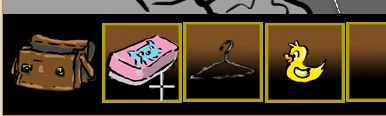
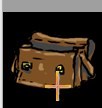
    The placeholders don't show as active, either. See the pictures for details.

    Where could I have gone wrong? I followed the tutorials here: https://www2.visionaire2d.net/glenfx/ and sebastian's glorious hitchhiker's guide (they don't differ too much, so I think I should be fine here).

    Please, help! Thanks a lot!
    Cheers,
    Jonas

    Newbie

    6 Posts

  • #2, by ygmantell Tuesday, 15. August 2017, 15:50 9 years ago Quote
    Firstly, I would make sure "Allow dragging of items from inventory" is checked in the game properties tab.

    Then, make sure your mouse action (in the Inventories tab) has "Items can be dragged with this command" checked.

    Great Poster

    274 Posts

  • #3, by sebastian Tuesday, 15. August 2017, 15:55 9 years ago Quote
    Do you only can't drag them or are they not clickable in any case (no action text change)? Maybe there is some other interface or button area in front of it which overlays the item slots so you cant interact anymore.

    Thread Captain

    2346 Posts

  • #4, by whalesnack Tuesday, 15. August 2017, 16:07 9 years ago Quote
    "Do you only can't drag them or are they not clickable in any case (no action text change)?"

    That exactly.
    I put in the button areas as well as the interface area. Maybe there is the evil overlap? I'm going to check that, but can I change their order?


    Newbie

    6 Posts

  • #5, by sebastian Tuesday, 15. August 2017, 17:14 9 years ago Quote
    "Do you only can't drag them or are they not clickable in any case (no action text change)?"

    That exactly.
    I put in the button areas as well as the interface area. Maybe there is the evil overlap? I'm going to check that, but can I change their order?
    The order of your button entries inside an interface is the order they get drawn.
    Also the order of each interface determines which interface gets drawn above/below another interface.

    Thread Captain

    2346 Posts

  • #6, by whalesnack Tuesday, 15. August 2017, 21:52 9 years ago Quote
    I did check that now, seems fine according to my knowledge.

    I'm sure I made a very rooky mistake that does the harm - but where?
    I'm close to setting uup the whole thing again from scratch. ??

    Newbie

    6 Posts

  • #7, by esmeralda Wednesday, 16. August 2017, 09:10 9 years ago Quote
    I did check that now, seems fine according to my knowledge.

    I'm sure I made a very rooky mistake that does the harm - but where?
    I'm close to setting uup the whole thing again from scratch. ??

    Maybe you could post some screenshots of your interface settings or - if that is ok with you - a link to your project.
    I guess you are using the newest version of the engine?

    Key Killer

    567 Posts

  • #8, by whalesnack Wednesday, 16. August 2017, 12:30 9 years ago Quote
    I use version 4.25.
    Here is my project as a .zip-file - if you could take a look, that'd be great!

    I hope this works - if you have a tip for a better way to share the file, I'm open to suggestions smile

    Thanks a lot!

    Newbie

    6 Posts

  • #9, by sebastian Wednesday, 16. August 2017, 13:38 9 years ago Quote
    For some curious reason the inactive image of the item slots are overlaying the slot-area. Thats weird, for me it looks more like a bug in the engine.

    For a quick workaround just place the inventory slot images in the background image of the open inventory and remove the inactive images of each slot.

    EDIT : also look at your walkmaps/waypoints and object polygons inside the scene. The console mentioned "bad polygons" here...

    EDIT2: The thing i mentioned above seems not to be the final fix ... Very odd. When i move the polygon of slot1 to the left so it overlays the bag a bit i can access it in that area...

    Thread Captain

    2346 Posts

  • #10, by whalesnack Wednesday, 16. August 2017, 14:09 9 years ago Quote
    Thanks a lot!
    I will check the polygons then and try your suggestion. I planned on re-designing the slots anyway - good point to tackle that.

    Newbie

    6 Posts

  • #11, by esmeralda Wednesday, 16. August 2017, 14:58 9 years ago Quote
    Wenn das ok ist, schreib ich schnell auf deutsch.

    "For some curious reason the inactive image of the item slots are overlaying the slot-area. Thats weird, for me it looks more like a bug in the engine."

    Dachte ich auch zuerst, aber das ist es nicht.

    Die Interface-Area scheint sich allein auf das Hintergrundbild für das Inventar zu beziehen. (war mir so auch neu) Egal ob du sie größer einzeichnest.
    Ich habe probehalber dein Hintergrundbild, das nur aus der Tasche bestand, auf die Breite mit den Slots erweitert (nur alpha-layer) und schon kannst du dein Inventar nutzen.

    Noch als Anmerkung: Wie Sebastian geschrieben hat, ist dein Wegsystem recht unaufgeräumt. Da überschneiden sich einige Wege und Punkte scheinen doppelt zu sein.
    Und so wie du dein Spiel zur Zeit aufgebaut hast, brauchst du auch nicht 4 Befehle, wenn du ohnehin nur Linksklick und Rechtsklick verwendest und nicht die Befehle änderst. Da reicht 1 Befehl und der Cursorwechsel, den du eh schon drin hast. "look" "use" und "talk" bei den Befehlen kannst du löschen, ohne dass sich an deinem Spiel etwas ändert.

    Key Killer

    567 Posts