Login / Registrieren
DE EN FR ES IT CZ
Zurück Nach oben

Fullscreen problems

  • #1, by Joemcr 9 years ago Zitieren
    Hi guys,
    I've got a player reporting problems getting my game to run fullscreen.
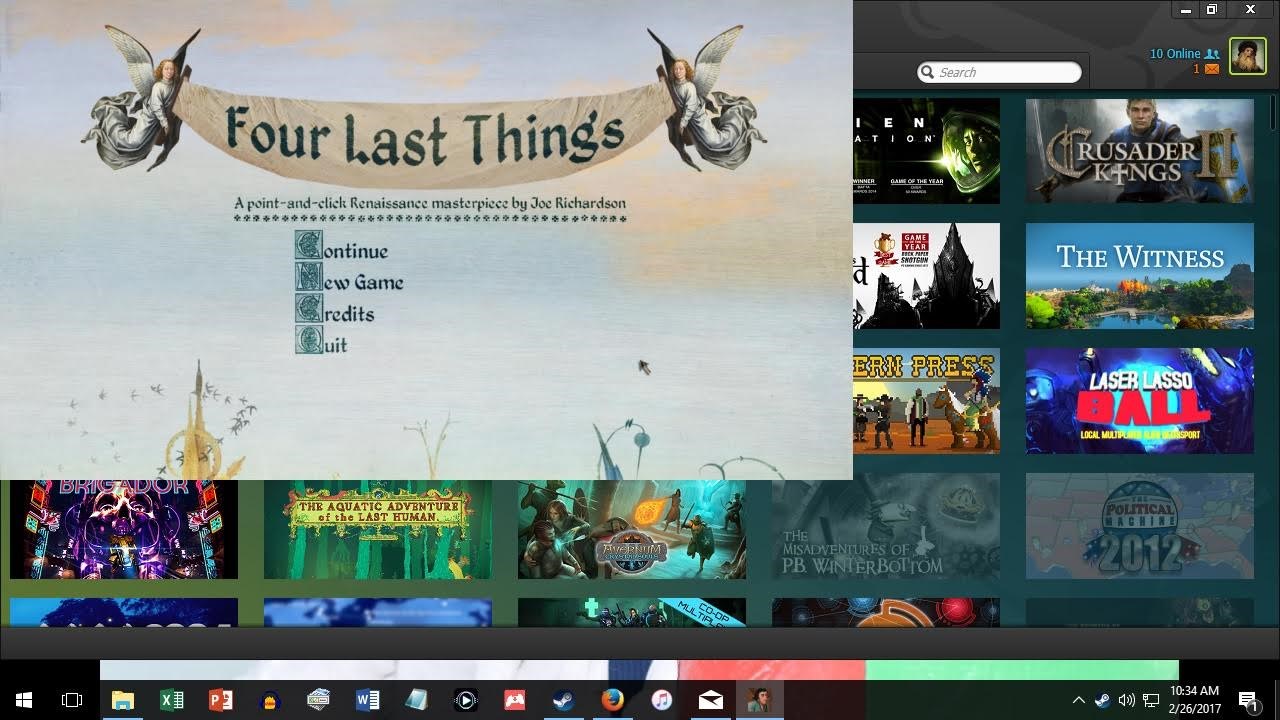
    He's using a win10 PC connected to a 1920x1080 TV via HDMI. The game is also 1920x1080, but regardless of config settings it won't cover the full screen.
    I've attached an image of the problem in action.
    Any ideas?

  • #2, by afrlme 9 years ago Zitieren
    How big is the actual TV? It's probably displaying at actual 1920x1080 & not the 50" tv screen equivalent of 1920x1080 scaled up to fit the 50" screen. Or maybe it just doesn't like the TV?

    For the reason why, I have no idea mate. Sorry. I'm pretty sure Simon will know the reason & reply whenever he spots this thread.
  • #3, by sebastian 9 years ago Zitieren
    The guy could try ALT + ENTER twice to switch between window/flullscreen mode. Maybe it initializes again and get the right size...
  • #4, by SimonS 9 years ago Zitieren
    There's a problem with high-dpi-scaling, so either set the dpi to 100% or change the dpi handling in the compatibility tab of the exe.
  • #5, by Joemcr 9 years ago Zitieren
    Thanks for the responses chaps! I've passed the information on... Fingers crossed smile
  • #6, by SimonS 9 years ago Zitieren
    Please don't triple post the same thing.

    The Windows 10 update has changed some things the dpi system and SDL has some compatibility problems with that. It will be fixed in the future.
  • #7, by afrlme 9 years ago Zitieren
    Pretty sure Simon will sort it out when he can.

    As for what you are saying about other players probably not knowing how to sort it out... well that might be true but that doesn't mean you can't publish a bunch of troubleshoot information when you release your game. If you release a game on Steam it gets its own dedicated information hub kind of like a forum for people to post questions & information & share screenshots & walkthroughs & tips & so on. Wouldn't be hard for you to create a known issues & fixes thread & pin it to the top.
  • #8, by battlefox 9 years ago Zitieren
    After several tries I can confirm that Visionaire 4.25 is not compatible with Windows 10 standard Display-Settings (which is usually set to 125%). The only workaround is the trick with changing the DPI Setting on the Exe or force the user to set the DPI scaling themselves in the Windows Settings.

    The other solution is, to use a launcher that sets a fixed resolution instead of AUTO/GAME/DESKTOP.

    The best solution would be that the Visionaire Team could fix this serious bug.