Menu
Login
Language
DE EN FR ES IT CZ
Back

Fade to White Execute Script?

  • #1, by ygmantell Thursday, 31. August 2017, 14:43 8 years ago Quote
    So I want the fade for flashbacks in my game to be to white, but I'm not sure how...
    I know theres the method where I have an all white image that I fade in and out, but that seems like the biggest pain (having that object on both scenes?)

    Is there a script or something I can just call or execute to fade the scene to white and back?
    I use the bit of code below to fade to black, if that has any overlap...

    Thanks!
    game.CurrentScene:to(1000, {SceneBrightness = 0})
    Great Poster

    274 Posts

  • #2, by caligarimarte Thursday, 31. August 2017, 15:01 8 years ago Quote
    Visionaire 5 has a new Action Part for Color-Fades, right under the "Scene"-Header. smile

    Forum Fan

    145 Posts

  • #3, by dionous Thursday, 31. August 2017, 15:14 8 years ago Quote
    Correct, "Start color overlay" action part

    Forum Fan

    250 Posts

  • #4, by ygmantell Thursday, 31. August 2017, 15:16 8 years ago Quote
    Awesome!  Didn't know that!
    Thanks so much!

    Great Poster

    274 Posts

  • #5, by zurik Friday, 16. August 2019, 13:19 6 years ago Quote
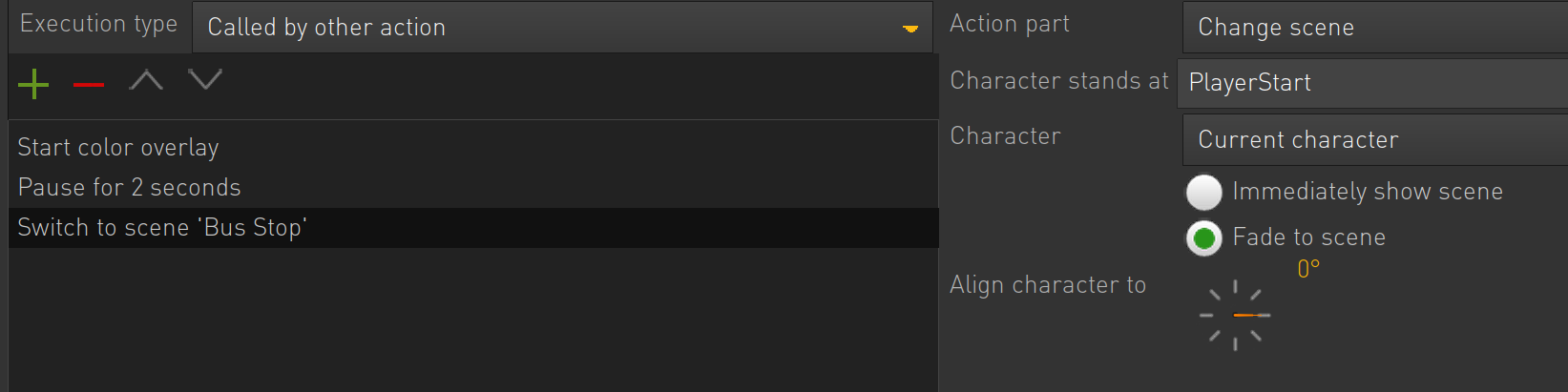
    Hey guys. How can I have a slow fade to black , a couple of seconds pause, and fade to a new scene? Should I use "Start color overlay"? I can't quite do it the way I want with "normal" fade to scene commands. I would like to have control over tha speed of the fade and lenght of the black screen. 

    Newbie

    40 Posts

  • #6, by afrlme Friday, 16. August 2019, 14:51 6 years ago Quote
    yeah start color overlay will work fine, you can also control the brightness of the scene too.

    Imperator

    7290 Posts

  • #7, by zurik Friday, 16. August 2019, 15:22 6 years ago Quote
    Thank you, but how do I fade from black to a new scene. This doesn't work grin

    Newbie

    40 Posts

  • #8, by esmeralda Friday, 16. August 2019, 16:30 6 years ago Quote
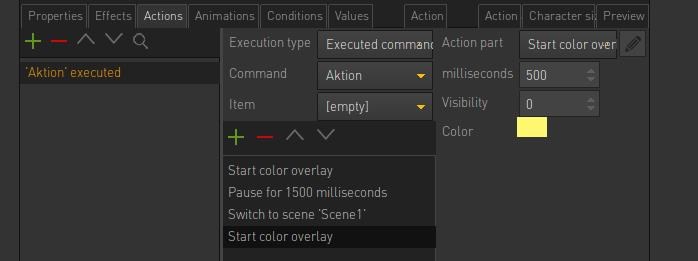
    set the scene change to immediatly and add another "start color overlay" after that. There you fade to the same color, but now set the visibility to "0".

    Key Killer

    567 Posts

  • #9, by zurik Monday, 19. August 2019, 09:36 6 years ago Quote
    Perfect! Thanks a lot! (There was a loop that started the fade several times - that's why I got confused). smile

    Newbie

    40 Posts