Login / Registrieren
DE EN FR ES IT CZ
Zurück Nach oben

Dragged items scaling

  • #1, by EldarionII 12 years ago Zitieren
    Hello guys,

    I'd like to change items size upon clicking on them in the inventory (cause they are too big). I didn't manage to find any option in generak settings, but I know it is possible (I've seen it in Deponia and other Visionaire built games). So I guess it's about LUA Scripting.

    Can you help me? smile

    Thanks!

  • #2, by afrlme 12 years ago Zitieren
    Do you just want them to scale on click? or in general?

    This is the Lua code that you would use for scaling an animation. This would scale instantly from current to the target scale value. Easing requires the use of the startObjectTweenFunction.
    ActiveAnimations["animation_name"].AnimationSize = 50 -- instantly scale down to 50%; replace "item_name" (case sensitive)
    

    local anim = ActiveAnimations["animation_name"]
    startObjectTween(anim, VAnimationSize, anim.AnimationSize, 50, 3000, easeQuintOut) -- scale to 50% over 3000ms (3s) with easing
    
  • #3, by Machtnix 12 years ago Zitieren
    I use two items in different scales...one for the scene, one for the inventary... *lol*
    That is not exactly what you want, isn't it? wink
  • #4, by EldarionII 12 years ago Zitieren
    I failed to make this "ActiveAnimations["item_name"].AnimationSize = 50 -- instantly scale down to 50%;" script work roll

    I need to instantly change items size upon clicking, so it would be like on pic.1 (Deponia). At the same time item in inventory remains same size.

    1(red) - original item;
    2(green) - new image (part of cursor + small item)
    3(yellow) - part of the original cursor

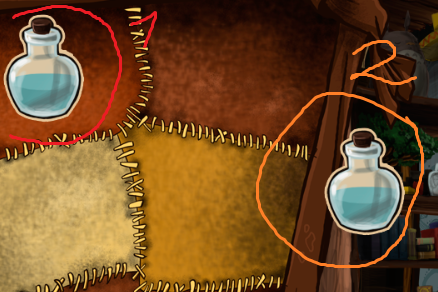
    Btw, in my game if I click on any item it wil completely replace cursor (pic.2 - my game)

    1(red) - original item in inventory;
    2(orange) - replaced cursor.

    So I wonder, maybe in Deponia they've just replaced items image with enother one (which is combination of the part of their cursor and small size original item)?

    I guess in that case I need a script that replaces images, right?

    I do not much care for cursor part to remain. I just need item image to become smaller (2green).

    Sorry if I didn't ask properly at the beginning. I am too dumb when it comes to scripting. =P

    Thank you for your help! smile
  • #5, by afrlme 12 years ago Zitieren
    Hmm you might have to do this manually.

    Instead of using dragged item you manually define the actions & use the set cursor action part inside of each item via the item tab.

    What you do is create a smaller cursor version yourself of the object which you add to the cursors tab. Then set cursor as needed depending on item you clicked. It's more work than using the dragged item.

    Alternative would be to create all item animations inside same cursor & force the active frames using lua script as required.

    Multiple ways to go about this.
  • #6, by afrlme 12 years ago Zitieren
    Hmm you might have to do this manually.

    Instead of using dragged item you manually define the actions & use the set cursor action part inside of each item via the item tab.

    What you do is create a smaller cursor version yourself of the object which you add to the cursors tab. Then set cursor as needed depending on item you clicked. It's more work than using the dragged item.

    Alternative would be to create all item animations inside same cursor & force the active frames using lua script as required.

    Multiple ways to go about this.
  • #7, by EldarionII 12 years ago Zitieren
    Thank you very much for your help! smile

    P.S. Machtnix thank you too. Didn't notice your post in time.
  • #8, by EldarionII 12 years ago Zitieren
    I thought I've seen the script that can force animation to show current frame, but I can't find it now roll

    Could you help me pls?

    Thank you!
  • #9, by afrlme 12 years ago Zitieren
    Animation has to be active for this to work, as does scaling of animations. Active means currently playing or preloaded.
    ActiveAnimations["animation_name"].AnimationFirstFrame = 1 -- first frame set to 1
    ActiveAnimations["animation_name"].AnimationLastFrame = 1 -- last frame set to 1
    
  • #10, by EldarionII 12 years ago Zitieren
    I want to use this script for showing 1 frame from cursor animation. In that case what should I write as "animation_name"?
  • #11, by afrlme 12 years ago Zitieren
    Whatever you named the cursor? grin

    But good point as there is both active & inactive animations for each cursor. The names have a prefix on the end. cursor_name (active) or cursor_name (inactive)

    -- function to be added as a definition script
    function setCF(n, f)
     if ActiveAnimations[n .." (active)"]:getBool(VAnimationActive) then
      ActiveAnimations[n .. " (active)"].AnimationFirstFrame = f
      ActiveAnimations[n .. " (active)"].AnimationLastFrame = f
     elseif ActiveAnimations[n .." (inactive)"]:getBool(VAnimationActive) then
      ActiveAnimations[n .. " (inactive)"].AnimationFirstFrame = f
      ActiveAnimations[n .. " (inactive)"].AnimationLastFrame = f
     end
    end
    

    -- example usage
    setCF("default", 1) -- will set frames of currently active animation of cursor "default" to 1
    

    ...the function I have just written queries if cursor names animation you just entered is currently the active or inactive animation; if neither then do nothing.

    Hopefully you understand what I just did? I would have made it simpler but there's no tables in the data structure for returning currently active game cursor or cursor state, hence why I used the AnimationActive query instead.

    Quick note: as soon as the cursor state changes the animation will reset back to normal. So it might be an idea to create a value which will be used to determine which frame should play & then add the ActiveAnimation... first/last frame scripts to the first frame of the animations themselves.