Menu
Login
Language
DE EN FR ES IT CZ
Back

Clearing Saved Games

  • #1, by mikael32225 Saturday, 08. July 2017, 12:11 9 years ago Quote
    I'm trying to work out the behavior of my save/load game menu, but it's a bit tricky as I can't find a way to clear out my saves. I know I can overwrite, but I'm trying to find out how the game behaves when the slots are empty.

    Is there a way to clear them inside Visionaire? Or is it a file I can find and delete?

    I'm on a Mac if that matters.

    Newbie

    42 Posts

  • #2, by sebastian Saturday, 08. July 2017, 12:47 9 years ago Quote
    go into your users /Library/Application Support/(companyname/)gamename/ folder. The should be your savegames 

    Thread Captain

    2346 Posts

  • #3, by mikael32225 Saturday, 08. July 2017, 13:26 9 years ago Quote
    Thanks!

    For some reason the Library folder was hidden – had to dig it out.

    Newbie

    42 Posts

  • #4, by petertermanhansen Wednesday, 27. February 2019, 10:38 7 years ago Quote
    Hi

    Cannot find the path.
    Do you have an example on the name of the file of a saved game?

    Regards

    Newbie

    84 Posts

  • #5, by esmeralda Wednesday, 27. February 2019, 10:54 7 years ago Quote
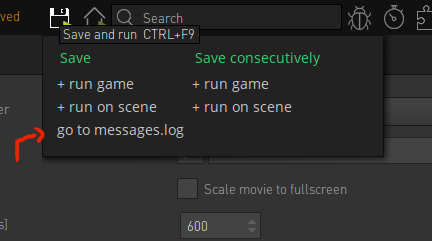
    You can find your savegames via the the editor. Just use the "go to messages.log" option in the save and run button. This guides you not only to the messages.log but also to the folder where the savegames are located.


    Key Killer

    567 Posts

  • #6, by petertermanhansen Wednesday, 27. February 2019, 11:02 7 years ago Quote
    thanks again

    Newbie

    84 Posts