
Login / Registrieren
DE EN FR ES IT CZ
Zurück Nach oben

Camera move with anticipation and reaction [Solved]

  • #1, by TinTin 8 years ago Zitieren
    Hi

    How can I modify camera  motion with anticipation and reaction?
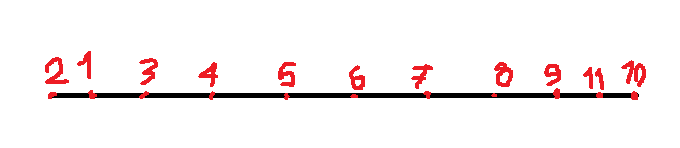
    For ex: We want move camera from left to right: In first, move a little to invert direction (anticipation) and move to right and pass from target (reaction)  and finally back to target.

    Please see image:

  • #2, by afrlme 8 years ago Zitieren
    I'm not 100% sure on what you are asking for here. In layman's terms you are wanting to first move the camera a fraction to the left of the characters position & then pan all the way to the right of the scene before finally moving back to the characters position?

    execute a script >
    game.ScrollCenterCharacter = false  -- stop camera from centering on the character
    
    game:to(250, {ScrollPosition = {x = (game.CurrentCharacter.Position.x - 50), y = game.ScrollPosition.y}}, easeQuintIn)

    pause for 250ms
    execute a script >
    game:to(3000, {ScrollPosition = {x = 1920, y = game.ScrollPosition.y}}, easeQuintOut, false, true)


    No idea if it will work.
  • #3, by sebastian 8 years ago Zitieren
    sounds like a good job for an easing function (easeBackInOut)  that lets the camera move like that

    game:to(3000, { ScrollPosition = {x = 1500, y = 0} }, easeBackInOut)

    moves the camera to x=1500 in 3000ms
  • #4, by afrlme 8 years ago Zitieren
    sounds like a good job for an easing function (easeBackInOut)  that lets the camera move like that

    game:to(3000, { ScrollPosition = {x = 1500, y = 0} }, easeBackInOut)

    moves the camera to x=1500 in 3000ms
    You're right mate, but you forgot to add the true value after easing to make it reverse afterwards.

    delay >  parameters > easing > loop > reverse

    I also completely forgot that there was an easing to make it move away from target first. He still needs to clear centering from the character to be able to scroll the camera I think?
  • #5, by sebastian 8 years ago Zitieren
    as far as i understood it should go back to the target, not to the beginning. I interpreted that "back to the target" into the easing function which does exactly what he described
  • #6, by TinTin 8 years ago Zitieren
    Thanks so much guys.
    @AFRLme
    I'm 2D animator and I want some cartooning camera motion. please see here for more info:
    https://www.google.com/search?source=hp&ei=hFKVWr6REaWm_QaVz...

    Also your codes doesn't work perfect for me. It move fast and seems there is not anticipation and reaction.

    @Sebastian
    I works fine with anticipation but without reaction. How can I fix it with reaction too?
  • #7, by sebastian 8 years ago Zitieren
    @Sebastian
    I works fine with anticipation but without reaction. How can I fix it with reaction too?
    Have a look here: http://easings.net

    These are the available methods you can use. Note that the names differ in VS.
    easeInOutBack for CSS is easeBackInOut in VS

  • #8, by TinTin 8 years ago Zitieren
    Great!!!. Works perfect smile
    Thanks so much


  • #9, by afrlme 8 years ago Zitieren
    Interesting & yeah sorry, like I said... I didn't really understand what you were asking for. My bad!
  • #10, by TinTin 8 years ago Zitieren
    Interesting & yeah sorry, like I said... I didn't really understand what you were asking for. My bad!
    I'm really sorry for my bad English

  • #11, by afrlme 8 years ago Zitieren
    Wasn't that. I just didn't understand what you were asking for & I had no idea what the little number image thing you created was for.
