Login / Registrieren
DE EN FR ES IT CZ
Zurück Nach oben

Bug when loading frame sequence

  • #1, by LupaShiva 5 months ago Zitieren
    Hello

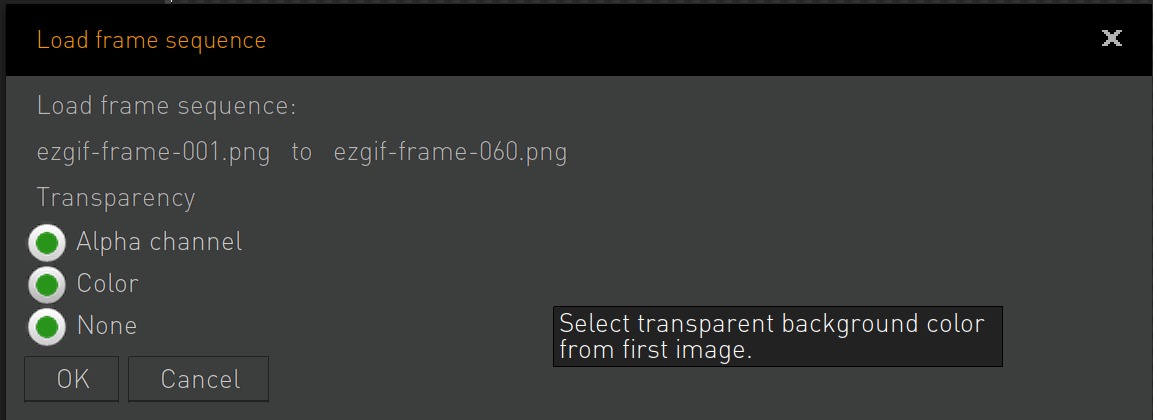
    I was trying to load a sequence of sprites and when choosing the background  transparency, it doesnt work and if i try to select any of the options the first one remains always choosen, as the picture attached, i can actually select the three options but it never removes the background from the srpites.

    Thanks a lot if anyone can help me
  • #2, by LupaShiva 4 months ago Zitieren
    Can anyone help? Any idea why it is doing this? Thanks 
  • #3, by SimonS 4 months ago Zitieren
    The transparency options don't do anything, the only working transparency is alpha channel transparency in the pngs. So you probably need to check if the they are set up correctly.
  • #4, by LupaShiva 4 months ago Zitieren
    Really? The color option wasnt supposed to take the color from the image and remove it, making it transparent? ??
  • #5, by SimonS 4 months ago Zitieren
    No, you need to add transparency in the images. 
  • #6, by LupaShiva 4 months ago Zitieren
    I think thats not right, volor option:

     "This option allows you to define a specific color within the image that Visionaire Studio should treat as transparent (known as color keying or chroma keying). You'll typically be prompted to select the color you want to key out."

    This is what i wanted to use, but not working, any help?

    Thanks
  • #7, by SimonS 4 months ago Zitieren
    The function to use the color key has been removed a long time ago. Only some parts remain in the UI, I will remove them for the next update. If you want to use a color key you either need to use a shader or just export the files with alpha transparency.
  • #8, by LupaShiva 4 months ago Zitieren
    Oh ok... thanks for the help, but i actually think it's something that helps, ill explain i created a video and turned into sprites, around 30 sprites, and clean each sprite from the background would be a pain, and was thinking in using the ingame color removal background, the color from the video i cant remove, because it removes unwanted areas, but whatever, thanks for the help.