Login / Registrieren
DE EN FR ES IT CZ
Zurück Nach oben

Audio files are not added into build standalone game

  • #1, by vanyanie 5 years ago Zitieren
    My character has an action that calls a Lua script to play different footstep sounds on different areas:
    local v = getObject("Values[FootstepSound]"):getStr(VValueString)
    local r = math.random(1,5)
    startSound("vispath:sounds/steps/" .. v .. r .. ".ogg", {flags=1, volume=20})
    

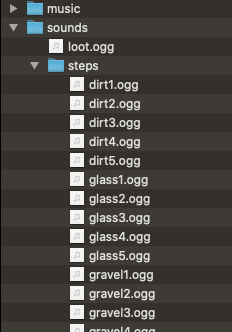
    The audio files are in the folder "sounds/steps" in my project folder (see picture)

    It workes very well when starting my game within Visionaire but when I build my game the output says "Missing sound/steps" (see picture) and the footstep audios are not play in the standalone game.

    How to fix that?
  • #2, by SimonS 5 years ago Zitieren
    Visionaire needs to now the files at build time, it can't runs these scripts and see what's coming out.

    So you need to have the paths like this:

    "vispath:sounds/steps/11.ogg", "vispath:sounds/steps/12.ogg", "vispath:sounds/steps/13.ogg"

    and select some of this table.
  • #3, by vanyanie 5 years ago Zitieren
    I understand the problem, but not how to fix it.  The script part

    "vispath:sounds/steps/" .. v .. r .. ".ogg"

    creates something like "sounds/steps/stone5.ogg"
    When I understand right, Visionare don't know the files bc it's not a fixed string, it's a string build on runtime. But how to tell VS there are files in folder x you need?

    What do you mean with "select some of this table"?

  • #4, by SimonS 5 years ago Zitieren
    You need to build up a table with all options in advance. Example:

    local soundtable = {
      stone = {
         "vispath:sounds/steps/stone1.ogg",
         "vispath:sounds/steps/stone2.ogg" ,
         "vispath:sounds/steps/stone3.ogg" ,
         "vispath:sounds/steps/stone4.ogg"
      },
      wood {
         "vispath:sounds/steps/wood1.ogg",
         "vispath:sounds/steps/wood2.ogg" ,
         "vispath:sounds/steps/wood3.ogg" ,
         "vispath:sounds/steps/wood4.ogg"
      }
    }

    local v = getObject("Values[FootstepSound]"):getStr(VValueString)
    local r = math.random(1,5)
    startSound(soundtable[v][r], {flags=1, volume=20})

  • #5, by vanyanie 5 years ago Zitieren
    Ok, I wanted to avoid to work with a table like this but I see it's nessasary.
    Thank you, it workes.
  • #6, by sebastian 5 years ago Zitieren
    cant the table be built up dynamically as well?