License from €75 Log in
DE EN FR ES IT CZ

Random animations during 'chase'

This thread is a few years old. Some details may refer to an earlier version of Visionaire Studio. Current tutorials
  1. · 12 years ago
    I have noticed that a characters random animations don't fire while they are 'chasing' another character. Is there an easy way to make them do this..? or will I have to mess about with random values and if statements in the standing animation...

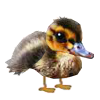
    To clarify, I am trying to make a small duck follow the main character around my entire game for no apparent reason. When the duck stops i want it to randomly cycle a few blink/shake/jump-up-and-down animations...

    Thanks
    • Image in post
  2. Working on a game?

    The free version covers up to 25 scenes per project. For more scenes and to sell your game, you need a license.

    See licenses Try it for free
  3. · 12 years ago
    When character stops, have it cancel the chase action, then redo when character starts moving again.

    I believe you will probably need a loop to listen out for changes in your characters state.

    function quackers()
     if game.CurrentCharacter.CharacterState == 3 and Characters["duck"].CharacterFollowCharacter ~= game.CurrentCharacter then
      Characters["duck"].CharacterFollowCharacter = game.CurrentCharacter
      elseif game.CurrentCharacter.CharacterState ~= 3 and not Characters["duck"].CharacterFollowCharacter:isEmpty() then
      Characters["duck"].CharacterFollowCharacter = emptyObject
     end
    end
    
    registerEventHandler("mainLoop", "quackers")


    No guarantee this will work. Written direct from my mind to thread without testing. The idea is that if character is walking & duck follow character isn't set then it should start following the current character else if character isn't walking & duck is still following character then it should reset the follow field back to nil.

    Add script as definition script.
  4. · 12 years ago
    hmm, I think the problem with that would be that the duck is much slower than the main character, so needs time to catch up.

    I seem to have got it working by stopping the chase in the action defined within the action part that starts the chase, then starting the chase on every left click... but this doesn't seem like the most elegant solution...?
  5. · 12 years ago
    Did you try it though? You could always have it launch a called by other action which contains a wait until character "duck" stops before executing the stop chase action.

    There's (almost) always a workaround solution to every obstacle.
  6. · 12 years ago
    Lee, the script works great. Just tested with multiple characters chasing and randomly animating. Thanks! This was something I was just wondering about...
  7. · 12 years ago
    Yeah, it works in terms of getting the random animations to run, but it causes the chasing character stops when the main character stops... Because my chasing character is a lot slower i need him to keep walking, while the main character is stopped, until he catches up...
  8. · 12 years ago
    I don't have the knowledge (i have zero lua/scripting knowledge) to tinker with the script, unfortunately roll
  9. · 12 years ago
    “
    Yeah, it works in terms of getting the random animations to run, but it causes the chasing character stops when the main character stops... Because my chasing character is a lot slower i need him to keep walking, while the main character is stopped, until he catches up...
    „


    True, just noticed this.
  10. · 12 years ago
    I just need you to create a called by other action (anywhere you like) & rename it to end_chase.

    Inside of this called by other action create the following actions...

    1. wait until character 'duck' stops.
    2. character duck stop chasing current character.

    Now add this revised script... (should do the trick for you).

    local distance = 250 -- radius from current character in pixels @ 100%
    local chaser = Characters["duck"]
    local temp_distance -- empty (will be used to calculate new distance based on current characters scale value)
    
    function quackers()
     if game.CurrentCharacter.CharacterState == 3 and chaser.CharacterFollowCharacter ~= game.CurrentCharacter then
      if ActiveActions["end_chase"] ~= nil then stopAction(ActiveActions["end_chase"]) end
      chaser.CharacterFollowCharacter = game.CurrentCharacter; chaser.CharacterFollowReachDistance = 0
      elseif game.CurrentCharacter.CharacterState ~= 3 and not chaser.CharacterFollowCharacter:isEmpty() then
      temp_distance = math.floor( (chaser.CharacterSize / 100) * distance)
      chaser.CharacterFollowReachDistance = temp_distance; startAction("Actions[end_chase]")
     end
    end
    
    registerEventHandler("mainLoop", "quackers")


    * edit #1: revised the script a little bit more. Having a follow distance radius means the chasing character will stop whenever character enters the radius area, so I've set it to 0 while walking to prevent chasing character from stopping, it's then reset back to the value you added to the distance variable on current character stop.

    * edit #2: sorry re-revised the script. now added temp_distance variable which is used to calculate distance based on chaser characters current scale value - makes it a bit more dynamic than having it set chase distance to whatever regardless of size of the characters on the screen.
  11. · 12 years ago
    This is perfect! Thanks. You are some kind of wizard...
  12. · 12 years ago
    Yes, yes... heard that all before. roll

    What I'm more interested in knowing is: does the wee duck have a sharp pointy beak, or maybe some sharp pointy teeth hidden under that beak? grin

This thread is closed because nobody has replied for more than a year. Feel free to ask your question in a new thread.

New thread

Really delete this post?
